Tuesday, November 1, 2016

Final Push and Failure

I ran jumpers wires on the back of the Apple II+ logic board to route the various signals I needed (PHI_0, AX, A14&A15) to the J1 socket area. Fortunately since only half of J1 is used by the Apple II+, I can use the unused pins of that socket to route my signals through to the new circuit I am adding.

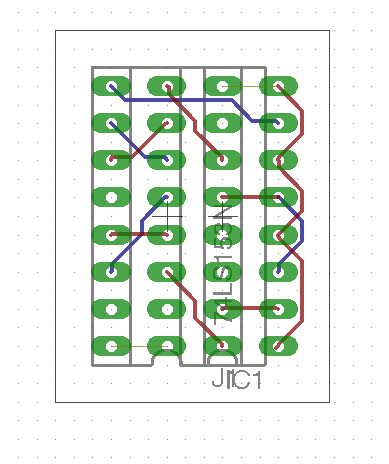
Here is my circuit diagram:

and the adapter board:

Warning - I don't know if this works yet.

After I ran the wires, I started trying to solder a tiny adapter board to translate the 74LS257 signal locations to the new 74LS153 IC. That was taking too much time for something that might not work at all, so I put the circuit on a bread board. Here it is:

Unfortunately, this did not work. I suspect that the dip jumper cable may be too long and adding some capacitance or delay. Or, the RAM timing may have been thrown off by the internal logic of the new IC. My Apple II+ is not booting and is in a similar state to when the RAM was in the wrong row. I'm sure I would have figured this out, but Halloween took priority.

Better news is that my Apple IIb is in a pretty final state. I think I will start buying supplies to actually build it.

Until next time, RetroChallenge!

Saturday, October 29, 2016

Apple II+ 64K RAM Refresh and Addressing

I managed to add my modifications back to the Apple II logic board to get the 4164 RAM enabled. It seems to be working! However, I want to address all 64K of the RAM, not just 16K. To do that, I need to refresh the extra RAM rows, multiplex the RAM row and column address for the new RAM address pin, and make sure that row C of RAM stays enabled instead of selecting row C, D, or E. See the detailed plan of attack by clicking below.

Friday, October 28, 2016

Troubleshooting Frustrations

I spent a number of hours last night and tonight trying to figure out why my modified Apple II+ was not beeping, and instead showing a screen full of question marks (or sometimes a white screen) on start-up, even after I added a row of 4264 DRAM. I swapped all of the ICs back and forth with my functioning Apple II+ and still had the same problem. At that point, I realized that I should have done some basic testing before I modified the logic board. I removed my modifications, and still had the same problem.

I found out that I could get very similar symptoms on my working Apple II+ if I removed the F2 74LS139 decoder, which selects which RAM bank to use. So I started checking continuity on my non-working board. I discovered that here wasn't continuity between the low bank selection line and the row that I had my RAM in. I thought I had found a major fault in the board. Then it hit me. The apple II+ rows are labeled A through K, and start with A on the bottom ROW. I had put my RAM in row E (the high address bank), instead of row C (the low address bank). I moved the RAM chips and after swapping out a bad chip, BEEP, and APPLE ][ at the top of the screen.

I felt so dumb. Hours wasted. So now I'm re-doing my modifications. Still time for some progress tonight. At least it's working. That logic board has't been fully functional in probably 30 years.

Tuesday, October 25, 2016

Apple II+ RAM Replacement - Power

Replacing the RAM in my Apple II+ has become a bit of a project in and of itself. Sure I could just buy some 4116 (16K bit) DRAM, but that's not very exciting, and its not an upgrade. So, Instead, I have been figuring out how I can use 4264 (64K bit) DRAM in its place. There are a lot of considerations that need to be made including power, refresh circuit, and addressing the new RAM. The descriptions below are for an RFI Revision 01 board, and may be different for other revisions. Click below to see the details of re-routing the RAM power lines and my preliminary results.

Sunday, October 23, 2016

Apple II+ Logic Board Repairs

Here are the two Apple II+ logic boards that I have for repair. They were mostly stripped of integrated circuit chips, and even have some ports and connectors that were de-soldered to repair other boards (back in the 1980's).

I chose to repair the board on the left due to the missing D6 RAM socket on the other board and a possible damaged trace under the F8 ROM.

I swapped the power connector and added a missing audio jack. These are still available on eBay as "panel mount mono jack":

A word of caution. I have found that the solder on these old boards has the potential to make you feel sick and hung-over. Drink some milk before you solder and work in a very well-ventilated area.

I was able to replace most of the missing IC on the board from the box of spares I had, and from the other board. I have no idea if they work, so that will probably require a lot of troubleshooting.

The only IC I could not replace from old pulls was the one labeled "9334" in the J14 position. Fortunately, this IC can be replaced by a 74LS259, which I had on hand from my early experiments with my SPI based Disk II emulator.

Finally, I did not want to have to troubleshoot with old, possibly bad RAM, so I have some 64K 4264 DRAM chips on hand to see if I can replace the original 16K 4116 chips. This will require some modifications to the logic board (due to the different power requirements and slightly different pinouts), which I hope I can complete before the end of RetroChallenge.

Sunday, October 16, 2016

Apple IIb Model

Added power supply and logic board texture. Color change to be Apple II+ olive-beige rather than Lisa tan-beige.

Saturday, October 15, 2016

Feet and Boots!

The parts donor Apple II+ I am trying to repair is really a mess. Even the rubber feet were harvested for another computer. Fortunately, I found some decent rubber feet on eBay. I bought two packs of 12 20mmx20mmx8mm and it is a great replacement part for Disk II and Apple II feet.

Regarding my other project, I was pretty scared to connect the repaired IIGS Upgrade board to a power supply, half expecting everything to start smoking. It boots! First time in about 15 years:
IIGS Upgrade board and composite video IIGS Upgrade board and RGB video
Composite video worksand RGB works!

Apple ][b Refinements

Coming along nicely. I used a more period appropriate keyboard layout, and I think it improved the over-all aesthetics. That's the kind of keyboard I would be using anyway. I am thinking, I might make this an Apple ][b -> IIGS upgrade, since the IIGS logic board is looking so good. I could also use the internals of an AppleColor RGB monitor that I have for the IIGS.

Thursday, October 13, 2016

Apple IIGS Repairs

Here are the fruits of my labor for the past two weeks. I had already attempted to repair this Apple IIGS Upgrade board, after a battery explosion did a lot of damage to the board and chassis. However, I wasn't really satisfied with how it was working out. I purchased some copper tape, and I am impressed at the way it worked to replace the traces. Much flatter and smoother, like it should be. A couple of resistors replaced and I tinned it all. Then, a lot of continuity testing. I bought some UV cure solder mask and after some time in the sunshine and under a UV light, it looks pretty good. Not perfect, but considering the terrible damage inflicted on this board, I am impressed!
Trace repairs and new SMT resistors in R193 and R14 locations.

Trace repairs and new battery holder.

Copper Tape, UV cure Solder Mask, and a weird spatula thing.

The Hakko soldering iron definitely made this possible. I am afraid to hook up the power supply though...

Tuesday, October 11, 2016

Some Progress, Some Distraction

I spent some time last week working on a Google Sketchup rendition of my hypothetical Apple IIb. The idea is to solve some of the problems with the Apple II+ as a incremental update. It is clear from the Apple II+ design that some of these fixes were deliberately removed from the design late in the process, possibly to keep cost down and possibly because the Apple III was on the horizon. For instance, the odd keyboard decoder arrangement and missing switch clearly contemplated lowercase and a keypad, but the final design did not include either. Here are my specs:
  • 80 columns. This is difficult without a full terminal card, which was how most Apple II+s were upgraded.
  • Upper/lower case keyboard. Shouldn't be too hard, other than a new character ROM.
  • Separate keyboard with numeric keypad. This didn't catch on until after the Apple III, but it should be a relatively easy addition.
  • Integrated disk drives.
  • Integrated monitor. I'm indifferent here. Although I really think the Tandy TRS-80 Model III and Apple Lisa are some of the best looking retro computers.
  • Two serial ports, and a parallel port. This just requires a few expansion cards.
So, mostly a standardized, well equipped, Apple II+ with a few conveniences we have come to expect. Here is my first rendering with elements borrowed from Lisa I and Apple IIe Google Sketchups:
So, that's the progress. The distraction is work on my Apple IIGS Upgrade. Rather than take on another project (Apple II+ logic board), I decided to dive head first into fixing the IIGS. After replacing some of my previous repairs with copper tape, and a lot of soldering, it looks pretty good. The solder mask is curing under UV light, so I will have pictures tomorrow.

Wednesday, September 21, 2016

RetroChallenge 2016/10 Entry

RetroChallenge 2016/10 snuck up on me due to the new start month. For my entry I would like to focus on the Apple II+.
  • First, I want to try to revive an old parts donor Apple II+ which is missing a lot of pieces and ICs.
  • Next, I would like to start work on designing the Apple ][b, a computer that could have been released by Apple circa 1979. The b is for business! An incremental release of the Apple II+.

Monday, March 21, 2016

Apple IIe RAM diagnosis

I have an old, un-enhanced Apple IIe that that would give me errors while trying to load disks, like: UNABLE TO LOAD PRODOS or NO BUFFERS AVAILABLE . Now that I know a lot more about the Apple IIe (and electronics in general) than when I put it in mothballs, I tried my hand at fixing the problem again.

I recently learned that by holding down the closed (filled) apple, while turning on the un-enhanced Apple IIe, it will do a self diagnosis. Here were the results:
RAM: F13 F12 F11 F10 F9 F8 F7 F6
This indicates that every built-in RAM chip was bad (or that the unenhanced Apple IIe can not distinguish which chip is bad). I didn't quite believe this could be true, so I tried replacing some of the ICs around the RAM... to no effect. So, I splurged on an ebay auction for a set of "MICRON MT4264-10 64K 100NS DRAM". I replaced all of the RAM chips, and my un-enhanced Apple IIe sprang to life for the first time in 25 years! As it turned out, only 2 of the RAM chips were bad, but they both failed in a way that would cause the self-diagnosis to report that all of the RAM was bad. Anyway, based on my machine having 2 chips that failed in the same way, I think it must be a relatively common problem.

Now all this thing needs is a "V" key and a replacement key switch. I think the V key is around here somewhere...

Monday, February 22, 2016

Apple II Development

I am pretty amazed at the current rate of development of new Apple ][ conveniences and devices. It is worthwhile to look up from a project to see what others are doing every once in a while.

VGA adapters for the Apple IIc and IIGS seem to be hot right now.

The Nishida Radio Disk II adapters are gaining more and more features, including a nice looking web interface!

Big Mess O' Wires had added Apple II support to the Floppy Emu Disk Emulator.

It's impressive to have a microcontroller with more power than the Apple II strapped on the back of it. Although it does feel like cheating sometimes...

I merely managed to find a switch that perfectly fits the Apple II keyboard encoder for enabling lowercase once the character ROM is updated. It is labeled "ONLEDA MTS-202" and is a knock-off of some old high-quality switch, I'm sure. Good ebay search terms : Right DPDT toggle switch. Just take note of how the pins are oriented to make sure you get the right ones. I'm putting mine away for a rainy day.

A new style of Apple II prototyping card popped up on ebay too. Had to buy one.

Saturday, February 13, 2016

USR-WIFI232 and ADTPro Continued...

I really wanted the standard ADTPro Ethernet connection to work properly so that I don't have to start the ADTPro Server from the command line. Unfortunately, that connection type adds a byte to the start of the ADT packet indicating the packet number. That seems appropriate for the UDP protocol that is used, but that one byte confuses the Apple II client enough that it immediately reports an error. Commenting-out the code that adds the packet number byte allowed me to get everything working, at the expense of out-of-order packets not getting re-ordered. Not a great solution, but it is more convenient now. Really, ADTPro Server just needs a decent interface for its SerialIP mode.

Full details on the ADTPro Support Forum (Archived on the Wayback Machine).

I really like this USR-WIFI232 compared to an Apple II ethernet card. It is compatible with anything that uses the Apple SSC card, has a nice web interface for configuring it, and includes WiFi, at a little over 1/2 the price. Unfortunately, the user guide can be a bit hard to decipher.

Tuesday, February 9, 2016

USR-WIFI232 and ADTPro

Based on my testing, the USR-WIFI232 appears to work fairly well with ADTPro giving yet another option for disk transfers. However, you have to set ADTPro to use Virtual Serial over IP (localhost mode). Open the ADTPro.properties file that gets created (using a text editor, such as TextEdit) and enter the IP address and Port number of your USR-232-WIFI. Quit ADTPro, run it again, and it will connect! I set my USR-WIFI232 device to use the following UART setting from the web interface: 9600,8,None,1,Enable,Disable,Disable, and set complimentary settings on the Super Serial Card (<ctrl-a>14B). ADTPro seems to like 8 data bits, which prevents you from using the USR-WIFI232 AT commands.

I used the ADT Serial Pacing setting of "Pacing: 1000" to get a reliable connection for bootstrapping. I don't think the speed settings are tested with a TCP connection to a real Apple //e.

Once the bootstrapping is successful and ADTPro is running, it was necessary to change the UART settings of the USR-WIFI232 via the web interface to: 19200,8,None,1,Enable,Disable,Disable, as ADTPro only runs at higher speeds.

Uart Setting
Baudrate
Data Bits
Parity
Stop
CTSRTS
485 mode
Baudrate adaptive (RFC2117)

Set the CONFI(G) in ADTPro to 19200 Baud Rate as well. After that was completed, I was able to transfer directory data, and a disk with ADTPro on it!

If the bootstrapped ADTPro gives an error INSERT SYSTEM DISK AND RESTART -ERR -1 when you restart your USR-WIFI232 (due to the hardware handshake, I think), just hit <ctrl>-<reset>, then type 800G<enter> to restart ADTPro.

Monday, February 1, 2016

Final RC2016/01 Thoughts

After some testing, I figured out that the reason I have to run everything at 300 baud has more to do with the screen redraw and processing speed of the Apple //e than the serial card. It's interesting that the Apple SSC manual derisively mentions that "Some printers are slow and do not provide a printer busy, or handshake signal to the Apple II." It provides a setting to delay after a Carriage Return for the printer to move back across the page. This is very similar to what is happening to the Apple //e which loses the first few characters after a line feedscreen scroll. I am sure there is an address on the SSC that can temporarily lower CTS to tell the remote system to wait until the redraw is complete. Anyway, there is plenty of work for a future RetroChallenge. BTW, the server is back up and running again, as it was down for testing most of the day. If you can't access it try later, as I am probably using the Apple //e for something else!

In the mean time, I have a slow server and a new way to communicate with the Apple //e. I also have a nice color monitor, and I have a little more insight into Steve Jobs. Finally, I have a few more project ideas (KIM-//e, more Apple on the web stuff) for future retro challenges. RC2016/01 complete!

Sunday, January 31, 2016

Truly Wireless Now

In a quest to make my Apple //e truly wireless, I did some soldering this morning to create a cable to go directly from the Apple Super Serial Card to the USR-WIFI232. This allowed me to get rid of the bulky DB-25->DB-9 adapter, and a short DB-9 cable to go from the adapter to the USR-WIFI232 (see photos).  Then, I used double-stick tape to mount the USR-WIFI232 on top of the Apple //e power supply. The Apple //e already has a pop-out that fits the antenna and power supply cord fairly well. The result is an internal WIFI adapter! I suppose I could get the power for the adapter from the Apple power supply, but I'd rather not run the risk.

I really like this set-up as connecting to the Apple over serial cables always meant finding the right cables and adapters, or a null modem. They would inevitably get unplugged for another project or to move the computer.

There is a lot of potential for this configuration for transferring disk images with ADTPro. I have to use 300 baud for the Apple BASIC interpreter to keep up, but it looks like higher baud rates will work in the terminal mode of the SSC, or with a compiled program. Come to think of it, you could even have a web page on the Apple //e that accepted disk image uploads.

This is a simple, and inexpensive ($40 on ebay) alternative to some of the other Apple Ethernet products out there. Some people have done similar things with a Raspberry Pi, but, again, this is pretty much plug and play and includes WIFI.

Having made two web servers out of old Apples, I am finding that it would be a lot more interesting to make a web browser. That will probably be a future project.

Saturday, January 30, 2016

Apple //e Webserver Running!

I have my Apple //e BASIC web server running!... sort of. Try it out. Be gentle and patient, it's only 300 BAUD!: http://162.232.186.125:8899

Code after the break.. Update: minor change in code to allow OPTIONS method

Minor DOS Disaster

Last night, I was putting the final touches on my Applesoft BASIC HTTP parser to act as a webserver when I had a pretty big set-back. I was getting pretty good working in DOS 3.3 and saving my BASIC programs regularly. I previously saved a small BASIC program to initialize the settings on the Apple SSC to communicate with the USR-WIF232. That way, I could just run the program and all of the settings would be restored after a <ctrl>-<reset>. Unfortunately, I named it INITSSC. The DOS command to initialize a disk is INIT. (I'm sure you can see where this is going.) Anyway, instead of typing RUN INITSSC I mistakenly just typed INITSSC (following the UNIX convention), and as I was keying back to correct my mistake, I accidentally hit the <Enter> key. WHAMO! Disk grinding and spinning, no response from the keyboard... It took me a few minutes to figure out what had just happened. My disk was initialized with no DOS on it. So I lost my programs, and I can't even run DOS, and that was the only floppy I have available.

The good news is that I was experimenting with dumping out the BASIC listing of my web server program as part of my webpage. So, I have all but a few lines in my terminal program's buffer. I just have to copy and paste it back to the Apple IIe and work around not having a usable disk.

Wednesday, January 27, 2016

More WIFI Details...

So, this USR-WIFI232 runs a TCP/IP server on port 8899. That allows me to telnet to the IP address and just start typing as if I were at the computer: ]LIST LIST 10 PRINT "hello" 20 PRINT "writing this from the internet" ]RUN RUN hello writing this from the internet ]

I just need to figure out how to open up my router to let the world in! ... And write a web server in BASIC...

WIFI enabled!

I took the day off from work, so I had a chance to get some real RetroChallenge work done!

It took a while to figure out that the USR-WIFI232 needs a null modem adapter to connect to a normal computer (but not to the Apple IIe in Terminal mode). I did not see that documented anywhere. Once I figured that out, I played around with the converter on my MacBook and my good ol' Macintosh G3. Some well-hidden tips:

  1. Use a null modem to connect
  2. type +++ to set the terminal mode. the module will respond with a
  3. type a and the module responds with +ok
  4. type AT+H for a list of commands.

I have struggled for a while to get my Apple IIe to connect to anything but my Macintosh G3, running ZTerm. This problem was apparent when I was unable to communicate between my Apple IIe and the USR-WIFI232 device. Oddly, I noticed that anything I typed was being echoed by the USR-WIFI232, but it would not respond to the Apple IIe. In fact, I was able to connect my Apple IIe, the G3 and the USR-WIFI232, at the same time, and view a complete transaction between the G3 and the USR-WIFI232 from the Apple IIe, but it would still not communicate with the USR-WIFI232!

I played around with the settings and discovered that the problem is that the (just mine?) Apple IIe Super Serial Card (SSC) does not seem to communicate correctly in the 8 Data, 1 Stop, 0 Parity mode. I had enabled the "No Extended Characters (strip hi bit)" setting in ZTerm which fixed the problem, but only for ZTerm. I think the Apple IIe was sending data with the high-bit enabled, which being echoed by the USR-WIFI232, then the Apple IIe would strip the high-bit making it look OK, even though the characters were junk.

Anyway, 7 Data, 1 Stop, 0 Parity mode works correctly. So, to enable this setting on the Apple IIe, enter <ctrl-A> and then at the APPLE SSC: prompt, enter: 1D . For the USR-WIFI232, enter: AT+UART=9600,7,1,None,NFC, then AT+Z. Once I did that, I was able to send and receive commands between the Apple IIe and the USR-WIFI232! I am losing a little bit of data from the USR-WIFI232 at speeds greater than 300 Baud though.

Using the Terminal mode of the SSC, I could send various AT commands to the USR-WIFI232, but I couldn't really do much with it other than PING or scan for WIFI networks. Then, I discovered the built-in web socket webpage. This allowed me to send data through the webpage to the Apple IIe! When I exited the SSC terminal mode, I could send commands to AppleSoft BASIC, and I even ran a little program.

Monday, January 25, 2016

Kim-IIe Requirement list

Notes for requirements for Kim-IIe card... (AIIe = Apple IIe). I am making updates to this as I think things out...
RequirementStrategyImplementation
Soft switch to enable KIM card Use AIIe /DEVSEL line to enable access to a set of soft switches at AIIe $C0nx. (n =slot+$10) Either a
  • 74ls74 flip flop (1 switch)
  • 74ls259 addressable latch (8 switch)
  • 74ls75 4-bit latch (4 switch)
Enabling the card replaces AIIe $0000-$1FFF with KIM Use U7 decoder to bring AIIE /INH line low when soft switch enabled Maybe a diode on /INH connected to U7 pin 0
FeatureStrategyImplementation
Make KIM Page 23 (MOS 6532) available to AIIe $Cnxx AIIe /IOSEL low enables KIM $1nxx, (without enabling /INH).
i.e: one of Kim Page 17-23 (in K4-K5) depending on the AIIe slot
Eg: card in slot 7 makes $17xx (page 23) available at AIIe $C7xx.
  1. /IOSEL activates U7 (pin 12?)
  2. XNOR A12 and U7/Q6 (otherwise, we would decode Kim $07xx)
  3. Jumper connecting U7 pin 7 (Q6) to (diode?) KIM DECEN
  4. Diode to prevent /INH from pulling low?
Decode $Cxxx-$Dxxx using a 74LS145 connected to Y6 on the main address decoder enabled by /IOSEL.
Connect outputs 0-3 to K4-K7, 4-7 to K0-K3 to make $11xx accessible at $C1xx
Make KIM K4-K5 available at $C800-$CFFF when appropriate. AIIe /IOSEL with /IOSTROBE is stored and enables KIM $1000-$17FF, mapped to $C800-$CFFF (without enabling /INH?).
CFFF RESETs /IOSTROBE store.
  1. /IOSTROBE with /IOSEL active sets 74ls74 flip-flop.
  2. Jumper connecting U7 pin 7 (Q6) to KIM DECEN.
  3. output of flip-flop activates 74LS145 added above.
  4. Another address decoder or 74LS133 resets flip-flop when CFFF is on the Address bus.
  5. UGH, too much stuff...
KIM access to soft switches Hmmm... Hmmm...

Saturday, January 23, 2016

Apple IIe Kim-1 Simulator?

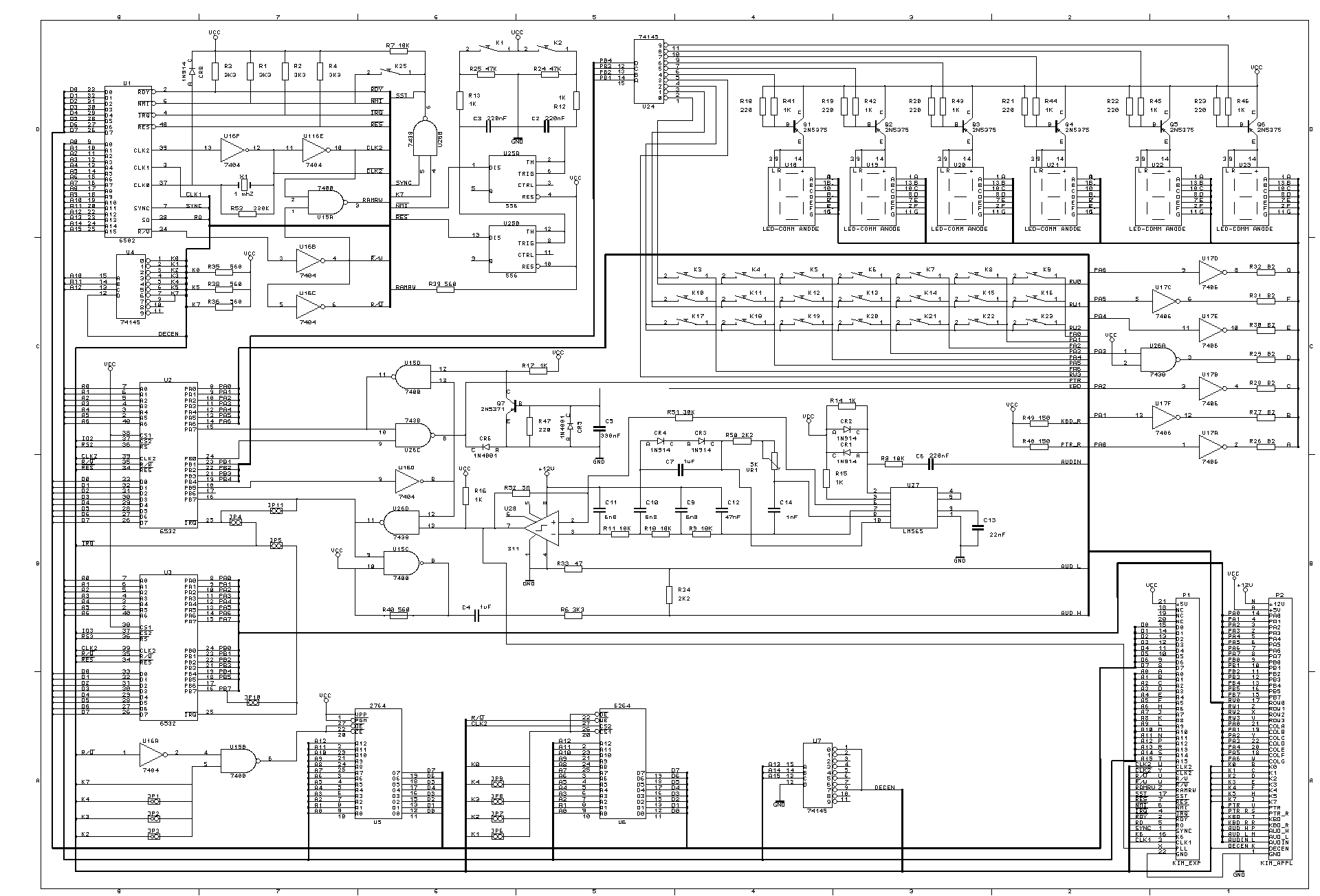
Feeling moved by some of the KIM-1 RetroChallenge entries, I had a thought last weekend: could I design an Apple IIe expansion card that acted as a KIM-1 simulator? The card could contain the address decoding circuitry, KIM-1 ROMs, I/O, and some RAM. Then, the keys could be from the Apple IIe, or maybe an external keypad. The Apple IIe would supply most of the RAM and the 6502 processor (of course). Utilizing the Apple IIe's INHIBIT (/INH) circuit would allow me to disable the IIe RAM and ROM and supply my own from the KIM-1, with out any address conflicts. The idea is so simple, I am surprised it hasn't been tried before. Researching the idea, I came across some schematics for building a modern KIM-1:

After spending some time researching the various ICs and circuits, I noticed an error in the 6502.org schematic. There is no decoder chip to select which of the 6532 RIOT chips is active.

Upon further research, I found Zimmers.net FTP site, with an identical schematic but with a 74LS138 IC in position U9 However, upon further research on the 6532 RIOT there is still a problem. The 74LS138 decoder does not appear to create the appropriate signals to select the correct RIOT's onboard RAM, according to the 6532 RIOT datasheet and KIM-1 memory map (see end of full post for details). I searched around, and found a schematic for the Micro-Kim which corrects the problem with several NAND gates.

I wondered, 'Why decode the address lines just to NAND them back together in various ways'? I made chart of all of the addresses and the bit logic to encode them and I am fairly confident that the 6532 RIOTs can be properly addressed by:

  • using A6 and a new /A6 as the chip selects
  • inverting A7 to make a new /A7 as the RAM select
  • using K5 as the other chip select
  • using A8 as the high bit of the RAM Address (A6) so that we can address all of the RAM on both RIOTs

As a result, we get 2 RIOTs and 256K of addressable RAM with the same basic memory map of the KIM-1. We need a single 74LS04 IC to invert a few of the address signals (which we already need to invert A4, according to the above schematics), and there is no need for the 74LS138 decoder or the 74LS00 NAND IC used in the Micro-Kim.

I created a spreadsheet to list all of the address values and visualize the signals I need.

Friday, January 22, 2016

Watched Steve Jobs (movie)

I watched Steve Jobs, the movie tonight. It was pretty good. It focused on 3 big product launches, with everyone coming to Steve Jobs to wish him luck, reminisce, etc. It portrayed Steve Job's growth as a visionary / CEO (and human being) through large leaps in time, which made the changes all the more pronounced. The acting was quite good, especially from Kate Winslet (who I didn't even recognize at first). Seth Rogan made a more likable Steve Wozniak than the actor in Jobs. The exploration of Steve Job's relationship with John Sculley was much more interesting than the portrayal in Jobs too.

The acting really carried this movie. Not much focus on Apple technology or period settings. This movie could easily be a live play with its very few scene changes, focus on the actors, and 3 act structure. Anyway, not a movie for tech junkies, but very well acted and directed.

Thursday, January 21, 2016

Color Monitor!

I thought I would need to buy a monitor for the Apple IIe, but instead I just re-purposed my daughter's old TV. Finally, games in color, instead of a tiny green-screen! Original Mario Bros, here I come!

Friday, January 8, 2016

Watched Jobs (movie)

For my first RetroChallenge task, I found the movie "Jobs" on Netflix tonight, so rather than be productive, I watched all of it.

Ashton Kutcher was decent. Other than the original Apple, there was not much screen time for Apple technology. The period cars are great - 70's Volvos, Mercedes, Pintos, Camaros, Corvettes, Triumph TR-7.

It was interesting to see the portrayal of Steve Jobs' perfectionism and how unique his personality was in the computer industry. I was surprised at the cold portrayal of relationships between Jobs and Steve Wozniak and Jobs and CEO John Sculley. I think the general tone seemed to portray Jobs as a victim of getting his company stolen from him. Steve Jobs definitely seemed to mellow with age from poor team manager to brilliant CEO.

Not a great movie, but not bad. Worth watching for free on Netflix.

Wednesday, January 6, 2016

RetroChallenge 2016/01 Attempt

So, RetroChallenge 2015/07 was a total flop for me. All I managed to do was go to the beauty shop to find hydrogen peroxide for Retr0brite. I couldn't find what I needed and pretty much gave up on everything. But, January has always been a better month for me to do this. Just a few, very practical goals:

  • Get a color monitor for my Apple IIe
  • Watch and review Steve Jobs, and Jobs
  • Try again to hook up an RS232 WIFI device to an old Macintosh, or maybe the Apple IIe

Sunday, June 28, 2015

RetroChallenge 2015/07 Agenda

July RetroChallenge requires moderation for me, so I will keep my challenges simple:

Monday, February 23, 2015

Reviving an original Macintosh

About a decade ago, I bought an old, neglected and very yellowed original Macintosh from Craig's List for $20. Inside was a Macintosh Plus logic board, but since the back panel had not been modified, the computer would not even close correctly. The analog board worked, but I wasn't going to modify the case to fit the logic board. I have been waiting for a long time to find a 128K logic board to properly fit inside of it.

I got lucky on ebay a few weeks ago and scored a Macintosh 128K logic board with a RAM and SCSI upgrade, as well as a 800k drive and the Mac Plus bracket for the drive. It was advertised as a "Vintage CPU Design Apple Macintosh 128k to Mac Plus motherboard upgrade kit." $75, including shipping from Canada, seemed like a good deal, since I have struggled to get anybody to let go of one for less than $100.

The board arrived about week ago and had the brand "CPU Design" on it. I screwed everything together, and it booted right up. It had 2.5 MB RAM, SCSI, and newer ROMs. The old Mac finally lives!

Click the link below to see lots of photos.

Monday, February 16, 2015

ElWhip 0.07 with New Features

I added some features to the ElWhip web server, some of which are built in to lwip, and some are completely new:
  • Dynamic File Read: The server will read the file in chunks which saves memory and allows much larger files to be in downloaded.
  • Dynamic headers: The server generates the headers now and they are not required in the HTML files. This makes it easier to add images and file downloads.
  • HEAD HTTP method support: The server responds appropriately to HEAD method requests.
  • 'Gentle Quit' in 128K: The application will report an error rather than crashing when trying to quit with 128K RAM.
See the ElWhip Download Page for more details.

Tuesday, February 3, 2015

RC 2015/01 Epilogue

A member of 68kmla.org was nice enough to test out ElWhip on a real Macintosh 128K: ...and a 512K.

First time getting a REAL Macintosh 128K on the internet. So great!

Sunday, February 1, 2015

ElWhip 0.06 Download and Video Finale

ElWhip Webserver 0.06 Download now available.

RetroChallenge 2015/01 Summary:

  • Repaired video on my Macintosh
  • Compiled and modified lwIP Web server to run on Macintosh
  • Wireless logging
  • Modified Mini vMac to run virtual serial ports on PPC Mac OS X
  • Lubricated all of my old Mac disk drives
  • First web server to run on Macintosh 512K
  • First PPP connection, TCP/IP stack, and web server to run on a (virtual) Macintosh 128K

So, a ton of work, but a success, even though it could still use a little work to clean up a few things. Thirty-one years after its introduction, the original Macintosh is finally on the web! This was a great experience and I was able to learn a little too much about the Macintosh Toolbox. This was a bigger project than I expected, and it took a lot of tweaking to get everything running in 128K. Thanks for the motivation RetroChallenge!

Loading HTML files in 128K

I spent most of yesterday trying to track down a nasty bug in the lwIP http server. Most of lwIP is very well coded, and other than the CRLF problem I had, very portable and bug-free. The lwIP http server is a bit of a hodgepodge of code though. Lucky me. Anyway, the callback to release the html file resources happens before the server has sent the TCP packet. As a result, I was free()ing memory before the server was done with it which caused corruption in the HTTP headers. I decided to just keep a file buffer up all of the time instead of malloc()ing and free()ing memory as needed. This was a constraint on the size of file that can be loaded though.

I spent the rest of the night moving more PPP code into a separate code segment that I can unload once the connection is up. It worked so well, I was shocked when I saw 9K of free RAM. This easily left me 4K of RAM to load HTML files. I can even open the menus without crashing. Unfortunately, it crashes on Quit on a 128K because it needs too much RAM to bring down the interface.

So, I will get an upload ready and get a video done in the morning!

Saturday, January 31, 2015

So close...

So I was able to finish the code to load the HTML files from disk using the original Macintosh File Manager calls. This saved quite a bit of RAM, and allowed be to get the server up. However, now it can't allocate enough memory to actually load a file. At least it logs the error gracefully, rather than crashing: PPP Phase Changed to: 8 App Limit: 91260 Free Memory: 9840 Starting Apps. App Limit: 91260 Free Memory: 2768 Error: "Unable to allocate memory for file." at line 105 in :::ports:mac:include:fsdata_custom.c

I am going to keep working on this today. Tomorrow is the Super Bowl, but I might have time to make a quick video, if I get it working.

Monday, January 26, 2015

Fancy Error Page

I worked much of the weekend trying to get the lwIP web server to load files from a disk drive. This could potentially save some memory because the files could be loaded on the fly, instead of all being loaded into memory at once. I had to enable a lot of additional code to get it working, which more than ate up the memory I hoped to save. Anyway, I reverted all of my code changes, and just fancied up the 404 error page that is compiled into the application. So, my Mini vMac virtual 128K is now running a little web server! I'll try to keep it up through the end of the month.

Saturday, January 24, 2015

Macintosh 128K 404 Error Server!

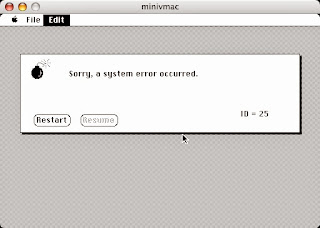
I have been spending a few hours after work slowly trying to conserve memory here and there by delineating parts of the code so that the open and close portions of PPP are in a separate code segment. My thought was I could unload that segment once PPP is up and then load in the HTTP server into the freed memory. This is not working as planned. However, I tried removing most of the HTML pages and the image imbedded in the HTTP server, to see if I was even close on memory usage. I was able to get it serving just a 404 Error HTML Page running in a virtual Mini vMac 128K Macintosh, with just 1K of memory to spare:
404 Error page from virtual Mac 128K. Note Free Memory!
 
Even opening a menu causes a crash.

Memory is so tight that even opening a menu causes it to crash with a 'Memory Full' error code. However, this gives me hope for 2 things:

  • If I load the HTML files from disk, as needed, I could probably save some memory.
  • Segmenting out some more functions could give me enough free RAM to really get this running.
I will leave it running overnight if people want to try it: virtual Mac 128k 404 Error server. I still need to do some hardware modifications to get my original Macintosh back to 128K RAM. I hope I am getting close...

Monday, January 19, 2015

ElWhip 0.05 Download

I had a major disk drive failure on my 512k. My external 800k Drive doesn't spin anymore, and my other 800k drives aren't compatible with 64k ROMs / HFS. That set my testing back a bit, as I went through and cleaned and re-lubricated all of my old disk drives.

Anyway, ElWhip 0.05 is available for download. Instructions are included.

Saturday, January 17, 2015

ElWhip Diet

I have been working on getting my ElWhip web server running in 128K, but I'm not there yet. It is crashing on a 128K Mini vMac right after it negotiates the IP addresses. So close!
The main cause is PPP, which takes up about half of the memory. I tried replacing PPP with SLIP today, but I can't get slattach (SLIP server) to work on Mac OS X 10.4, and it isn't included in newer versions of OSX. So, it's not a good solution. Click for the gory details...

Friday, January 16, 2015

ElWhip Icon

The name of my web server application, "ElWhip" (from 'lwIP'), inspired a Zorro-esqe icon:

'El Whip' would totally be my name if were a Mexican vigilante (or luchador).

It took me a while to remember that I need to set the Bundle Bit ("Has BNDL") in ResEdit for the older versions of the Finder to correctly show the icon.

Web server ran all day today!

Wednesday, January 14, 2015

Mac 512K on the Internet

I fixed a couple bugs this evening, including the netmask problem I was having. I just needed to set the ppp interface as the default interface ( netif_set_default()) and lwip routes all the packets through the ppp interface, even if its router/ppp server is outside the netmask network.

I enabled ip forwarding on Mac OS X to give public access to my Mac: sudo sysctl -w net.inet.ip.forwarding=1, and set up port forwarding on my router.

And so, here it is, on the internet for the first time: my Macintosh 512K Web Server Running System 2.0 and Finder 1.1g (http://72.220.233.84:8080). It is just using the default webpage right now - I need to set up a better one. It seems to work from my iPhone. It is 30 years behind on security updates, so please be kind to the old thing!

Leave a comment if it works for you. I'll try to get a video up this weekend with more details.

Monday, January 12, 2015

CRLF ≠ LFCR

I thought it would be an easy and quick project for last night to go back and properly fix the CRLF problem I was having. Unfortunately, it was not. I spent hours and hours testing the HTTP input string, hex-dumping, debugging, testing, and comparing strings using the lwip's built-in data compare functions. I still could not find what was going wrong. I started losing faith in the lwip code, the MPW complier, the Motorola 68000 processor, all of computer science. Was this really happening? It is getting so late, am I dreaming?

Finally, I double-checked a hex dump on the string to search for: "\r\n" and it reported: 0x0a 0x0d. At first, I thought 'that looks right', but then I noticed that it should be returning 0x0d 0x0a instead! How could it be transposing these predefined character escape sequences? A quick search on google revealed the problem: MPW transposes these two standard escape characters by default. I could't believe it. Of course, it is documented in the Apple SC/SCpp Reference for the MPW C/C++ compiler:

The compiler will by default map \n to the value 10 and \r to the value 13 to conform to the MPW environment. The -noMapCR option will turn off the mapping of the newline to carriage-return and carriage-return to newline.
If you are familiar with Macintosh line breaks (CR only), this makes sense, but if you are familiar with ANSI C code, it does not.

In the context of the lwIP web server, it was erroneously looking for 2 LFCRs, but wouldn't get them until there were 3 CRLFs: CR[LFCRLFCR]LF. Once I regained my sanity, the fix was easy:
/* #define CRLF "\r\n" */ /* WTF? I hate computers... */ #define CRLF "\x0d\x0a"

Compiler character mapping quirks, swapped characters and pulling hair out all seem to be themes in the RetroChallenge.

Saturday, January 10, 2015

Debugging Payoff

My new debugging setup, along with increasing the logging levels in lwip, quickly revealed some of the problems I am having. I managed to tackle a few of them last night.

First, I noticed my lwip ppp interface is not attempting to re-negotiate a connection. So, if it fails the first time, you have to quit the program and start again. This isn't very user-friendly, so I added a timed function to check the ppp status and, if necessary, alert the user and restart the ppp negotiation. This makes recovery from a timing problem much easier.

Next, during a failed connection to the webserver, I would get a warning like: pppos_input[0]: Dropping bad fcs 0xc540 proto=0x21
Basically, lwip was dropping ppp packets. The bad fcs was misleading and caused me some headaches. Finally, I noticed that every time this happened, about 4 lines before the packet was dropped would be a log entry: pppos_input[0]: got 63 bytes Now, lwip ppp reports got xx bytes whenever it gets data from the serial port. It is the 63 bytes that is significant, and was associated with the dropped packet. I happened to retain some information from my book, Inside Macintosh, Vol. II:

Each input driver's buffer can initially hold up to 64 characters, but your application can specify a larger buffer if necessary.
Ah! So, lwip was getting the opening part of a packet, which was cutoff by the buffer overrun, then getting another packet, ending with the checksum. The checksum wouldn't add up, so it dumped the packet (actually two packets). I think it reports 63 bytes rather than 64 bytes because the buffer is a pascal string with the first byte representing the string length(?). Fortunately, Inside Macintosh, Vol. II also provided a solution:
SerSetBuf allows you to specify a new input buffer, replacing the driver's 64-character default buffer.
So, I added a 256 byte buffer and the connection is much more reliable. It even significantly improved the rate of initial ppp negotiation.

Friday, January 9, 2015

Debugging the Debugging

I have been working on a way to get the proper debug logs out of ElWhip without using the modal dialog boxes which cause the program to stall until a user presses the 'OK' button. I have decided to just dump the logging output through the printer port, since I already have serial port code for ppp and the modem port. Unfortunately, that means I would need another serial connection between the Macintoshes. But, feeling inspired by another Retrochallenge project, I set up a bluetooth rs232 adapter for a wireless connection. I initially had a problem where bringing up the serial connection to the printer port would bring down the connection to the modem port, but I worked through a couple of bugs to get it working.

This should make it much easier to troubleshoot some of the intermittent problems I have had establishing the ppp connection and retrieving the web page.

 Wireless Logging with Bolutek RS232 - Bluetooth Adapter 

Monday, January 5, 2015

Virtual Distractions

I had a major distraction last night that kept me up way too late. One of the major limitations of the Classic Macintosh emulator Mini vMac is the lack of serial port realization (is that the right word?). There is a hack at spritesmods.com that includes a virtual tty connection from Mini vMac. The code is for an older version of Mini vMac and has a few bugs that prevent it from working on Mac OS X. This would be a perfect testing platform for ElWhip, if I could get the serial ports working. A lot of troubleshooting got me to here:

Mac Terminal in Mini vMac with tty to host computer

Unfortunately, it won't drain the incoming data until I press a key, so it is often displaying the input a little bit behind the output (eg: you have to start typing the username before the prompt appears). I think it needs a polled function to check for available data. I don't think it will work with ppp as-is. Hopefully, I can figure it out tonight.

Update: That was easy, I re-implemented an unused SCC_Update() function in the main run loop and it works great! Now to test ElWhip on it!

Update: Mind blown:

Elwhip running in Mini vMac with ppp connection to host
No web page though. Going to bed before I create some sort of causality loop. On that note, weirdest thing about Mini vMac: its build environment is a Mac 68k application that runs within Mini vMac.

Sunday, January 4, 2015

Uptime On Old Time Macs

Too many chores to do today, so I just let the web server run on the Macintosh SE, checking to see how stable it is. Running ping -i 60 192.168.11.130 | cat -n from the Mac OS X terminal pings every minute and lets me know how many minutes the TCP/IP stack stays up. It started losing pings around 65 minutes and eventually timed out altogether. This seemed to correspond with the After Dark screensaver on the Mac SE. I turned off the screen saver (and turned down the brightness knob), and the server ran for 174 minutes before I turned it off. There were with no dropped pings and it was still serving the web page when I stopped it.

After that, I ran the web server on the original Macintosh (still with 512K RAM), and had similar success. As far as I know, this is the first Macintosh web server with 64K ROMs or 512K RAM, ever! Certainly the first on System 2.0 and Finder 1.1g.

Saturday, January 3, 2015

Web Serving! - barely

I can serve a web page from the Macintosh SE! There was a problem where lwIP does not seem to be detecting the first CRLF (Character Return + Line Feed) required by the HTTP spec. So, when I used Telnet, I had to hit return 3 times before the HTML appeared. Web browsers will only send 2 CRLFs, then wait. I ended up deleting one of the checks for a CRLF from the code, and it worked! However, that doesn't explain why it isn't detecting the first CRLF. I think it could losing the last character of the buffer (LF) or something.

The process of dealing with this made me realize I can't keep overlooking a few problems I have seen:

  • Getting PPP to connect is too timing-sensitive and flakey
  • I can't always get the web browser to connect
  • PPP is a memory hog
  • I need to actually fix all of the "FIX ME"s I have been inserting into the code
  • I need a better logging / debugging system
Some of these problems are related. I need a good debugging system system before I can fix any of them. Enabling debugging currently causes a bunch of modal dialog boxes to appear. This causes further timing problems and does not allow logging for analysis.

Once I get some of these issues sorted out, I will test it out in 128K and make a download available.

Friday, January 2, 2015

HAKKO, how have I lived without you?!

Repaired Solder Joints
MacMemory Address Decoder Board

My Hakko Soldering station arrived today, and although I had intended on waiting until this weekend to do more RetroChallenge labor, new tools make it hard to wait. Anyway, this thing is amazing. It melted the solder joints so fast, I couldn't believe it. I am used to using dollar store soldering pens - NEVER AGAIN!

My Mac liked it too! Video came back on boot.

In other news, I took a close look at the RAM expansion circuit that was added to my Macintosh to address the additional RAM. I think I can just connect riser Pin 1 and 2 to make it a 128K Macintosh again for testing.

Edit: Actually, I will remove the 47 Ohm resistor too, just in case.

Thursday, January 1, 2015

Macintosh Webserver Recap and Restart

lwIP is a lightweight TCP/IP stack that was designed for embedded systems with, or without an Operating System. During RetroChallenge 2014WW, I was able to get MPW 3.5 compiling programs for old Macintosh System versions, port lwIP, and get a TCP/IP stack running on my Macintosh with 512K RAM. For RetroChallenge 2014SC, I was able to update my working version of lwIP and compile the webserver before life interfered.


I woke up this morning without much of a hangover, allowing for an early start on the challenge.

I updated my local copy of the lwIP source which has now incorporated the ppp-new branch into the main branch. It is nice to see continued development on lwIP. This updated ppp code was important because it allowed for ppp without multithreading, which is necessary for the early versions of Macintosh OS. With git installed, two quick commands did the trick: /usr/local/bin/git clone git://git.savannah.nongnu.org/lwip/lwip-contrib.git /usr/local/bin/git clone git://git.sv.gnu.org/lwip.git

After copying over my additions, and converting the end of line characters to be Mac friendly, I was able to compile it with MPW again.

I fixed the error about the fsdata source file not needed for link. As it turns out, that file is included through one of the header files, and does not need to be compiled separately as a source file.

Finally, I transferred the program to my Macintosh SE for testing (thanks ZIP drive). The PPP and TCP/IP connections come up fairly reliably, but, I couldn't connect to the webpage using Safari.

I Telnetted to port 80:
PowerMac-G4:/Volumes/Mac OS 9/Maclwip151 epooch$ telnet 192.168.11.130 80 Trying 192.168.11.130... Connected to 192.168.11.130. Escape character is '^]'. GET / HTTP/1.0 404 File not found Server: lwIP/1.3.1 (http://savannah.nongnu.org/projects/lwip) Content-type: text/html <html> <head><title>lwIP - A Lightweight TCP/IP Stack</title></head> [...]
And it seems to have worked! I will have to keep testing this evening and look through the code a bit to see why it is not loading with Safari (or FireFox).

I am already further along than RetroChallenge 2014SC!

Saturday, December 27, 2014

Pre RetroChallenge Spending Spree

Macintosh Floppy Emu
Hakko FX888D
Original AirPort Card
To satiate my excitement for the upcoming RetroChallenge, I have resorted to buying stuff for my computers. The idea of my 400k floppy disk drive grinding away every time the web server had a hit concerned me, so I reserved a Macintosh Floppy Emu floppy and hard disk drive emulator for vintage Macs. A new batch is expected mid January.

While browsing around that website, I noticed a review for a Bus Pirate interface. I remember seeing these on hackaday a while ago, but I didn't realize you could buy them on ebay now. So, I got one.

Since I need to do some soldering on the original Macintosh, I decided that the dollar store soldering iron wasn't good enough, so I splurged on a Hakko FX888D-23BY Digital Soldering Station.

I bought a $3 Airport card for my G4, just for the heck of it.

Because my Inside Macintosh book made for some interesting reading, I bought the Apple publication Designing Cards and Drivers for the Macintosh Family.

RetroChallenge, please come quickly before I spend all of my Christmas money!

Sunday, December 21, 2014

Retro Prep Problems

Macintosh analog board connection cable
The analog board connection cable.


Macintosh analog board connector solder joint
The top and bottom large solder joints are suspect.
I had some free time this weekend to make sure all the retro Macs were working before the start of Retrochallenge 2015/01. The G4 booted up as expected (I use it semi-regularly). The SE booted up as expected (it has proven very reliable). The original Macintosh booted up, but there was no video. I could tell it was limited to a video problem because clicking the mouse around would cause some disk activity.

I opened the computer up to investigate, but I didn't see anything obvious. I started it up while open (DANGER!) and noticed that slight pressure on the analog board connection cable would cause the video to come back temporarily.

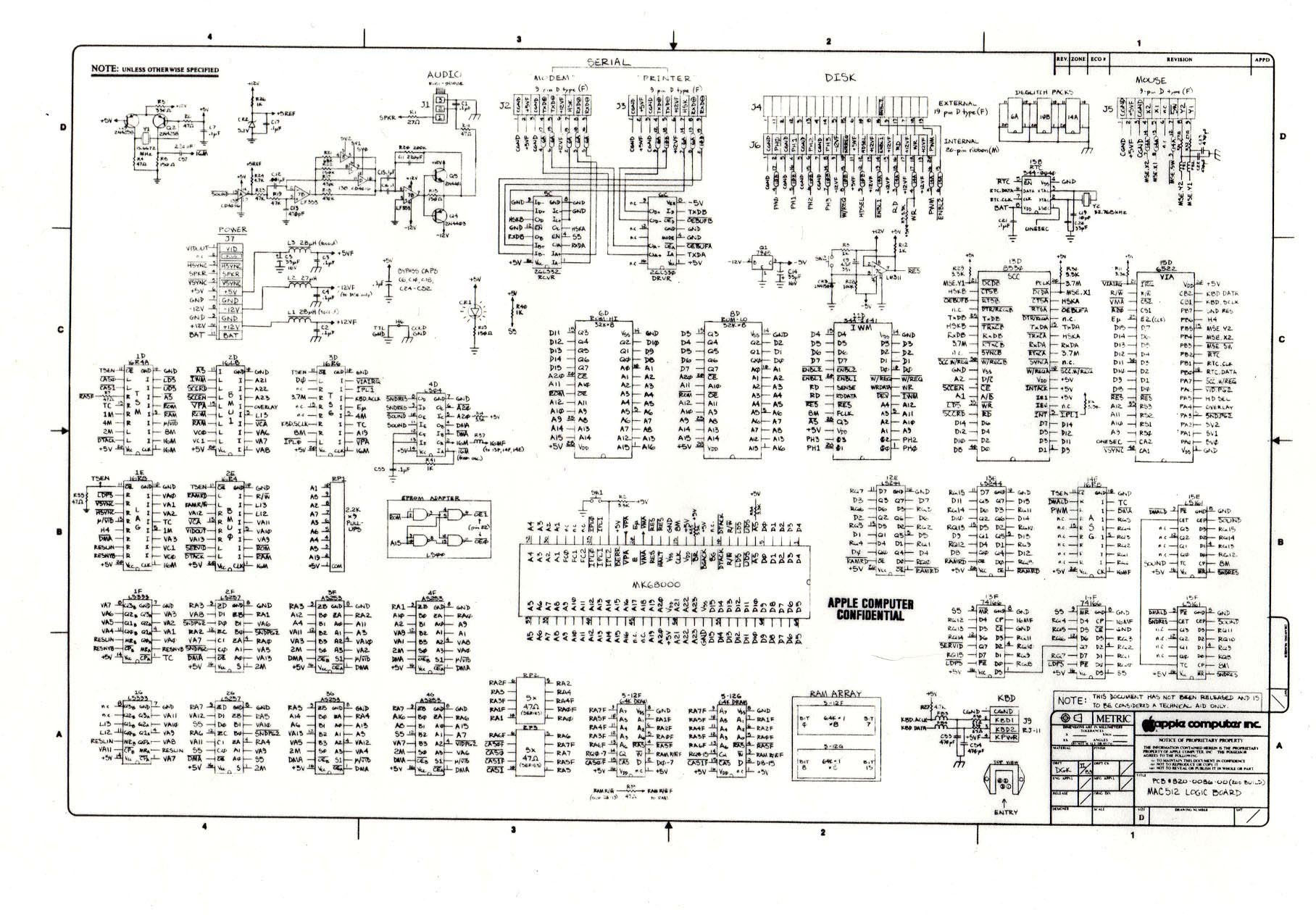
I looked closer and noticed a questionable solder joint which seems to correspond to video out, according to this Macintosh Schematic (J7, pin 1, VIDOUT).

I'm not sure I will have time to fix it before January, but it looks like it might be an easy fix.

Tuesday, December 16, 2014

RetroChallenge preparation

I recovered from the hard drive crash pretty well. I was able to make a disk image of the slowly dying drive, which I restored onto a newer drive. Fortunately, it retained all of my licensing information for the Adobe Creative Suite I have installed. I don't think the Adobe CS2 registration servers work anymore, so that would have been a real pain.

The Dual processor PowerMac G4 with Mac OS X Tiger is a real joy to work on, even though it is now 15 years old. The user interface is far more appealing than OS X Yosemite, and compiling programs proved quite snappy. The Mac OS 9 compatibility mode is nearly flawless. Plus, parts are dirt cheap for the old G3 and G4 towers.

On that note, I just received a new (to me) Belkin F5U220 USB 2.0 card to replace the old USB 1.0 card which temporarily replaced the OrangeMicro USB Firewire card that would crash on wake with the G4. It works great, and only $10.

No more excuses to not backup my drives!

Monday, December 15, 2014

Early Christmas gift: Fire in the Valley

Early christmas gift from a thrift-shopper friend. First edition!

Monday, December 8, 2014

Hard Drive crash!

I have already had a major setback for the RetroChallenge. While getting things organized, my hard drive started clicking and slowing down. Unfortunately, I backed up the wrong drive. By the time I figured out which drive was making the noise, it was too late to backup.
I ended up putting it in the freezer for a while and had a few error free minutes to get the most important stuff off. After tightening up the screws on the top and sending it in and out of the freezer, it seems to have shaped up considerably though, but it is running very slowly. I am now backing up the entire disk which, by the progress indicator, will take several days. So, at least there is some hope.

Tuesday, December 2, 2014

Retrochallenge 2015/01 Entry

Retrochallenge is back!
I seem to be able to get more done during the Winter Warm up than the Summer Challenge, so I am feeling ambitious. I still want to get a web server working on my Mac 128K, so that is my primary goal.  I have renewed my interest in working on my 1991 Nissan, and interfacing with the ECU using the Nissan CONSULT protocol.  It is a JECS microprocessor which is either a Motorola 6802 or Hitachi 6303 equivalent. It isn't the typical retro computer, but it seems to qualify.