Showing posts with label MPW. Show all posts
Showing posts with label MPW. Show all posts
Tuesday, March 13, 2018
ElWhip is on GitHub
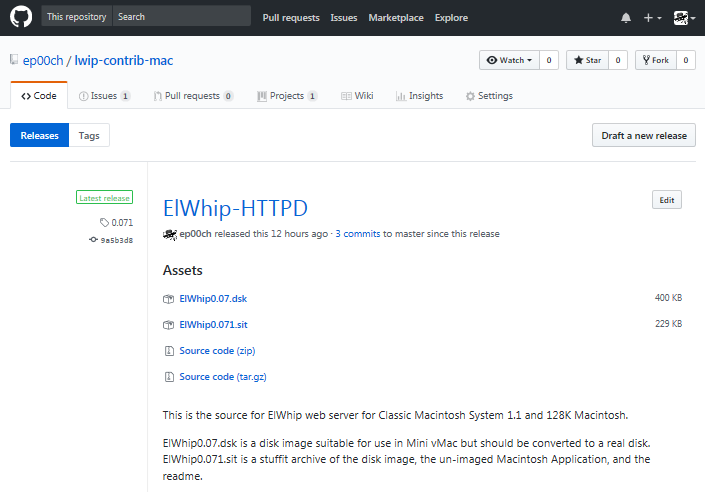
I uploaded my source code for ElWhip onto GitHub. Unfortunately, there are still some files that have Macintosh line endings, so some of the code can't really be viewed on GitHub unless you hit the "Raw" button. Hopefully it will inspire somebody to make a web browser for the original Macintosh. It will also make updates and additions to the code easier for me. Now that it is uploaded, it should make adding a log/status window quite a bit easier.
Saturday, January 17, 2015
ElWhip Diet
I have been working on getting my ElWhip web server running in 128K, but I'm not there yet. It is crashing on a 128K Mini vMac right after it negotiates the IP addresses. So close!
 The main cause is PPP, which takes up about half of the memory. I tried replacing PPP with SLIP today, but I can't get slattach (SLIP server) to work on Mac OS X 10.4, and it isn't included in newer versions of OSX. So, it's not a good solution. Click for the gory details...

Monday, January 12, 2015
CRLF ≠ LFCR
I thought it would be an easy and quick project for last night to go back and properly fix the CRLF problem I was having. Unfortunately, it was not. I spent hours and hours testing the HTTP input string, hex-dumping, debugging, testing, and comparing strings using the lwip's built-in data compare functions. I still could not find what was going wrong. I started losing faith in the lwip code, the MPW complier, the Motorola 68000 processor, all of computer science. Was this really happening? It is getting so late, am I dreaming?
Finally, I double-checked a hex dump on the string to search for: "\r\n" and it reported: 0x0a 0x0d. At first, I thought 'that looks right', but then I noticed that it should be returning 0x0d 0x0a instead! How could it be transposing these predefined character escape sequences? A quick search on google revealed the problem: MPW transposes these two standard escape characters by default. I could't believe it. Of course, it is documented in the Apple SC/SCpp Reference for the MPW C/C++ compiler:
The compiler will by default map \n to the value 10 and \r to the value 13 to conform to the MPW environment. The -noMapCR option will turn off the mapping of the newline to carriage-return and carriage-return to newline.If you are familiar with Macintosh line breaks (CR only), this makes sense, but if you are familiar with ANSI C code, it does not.
In the context of the lwIP web server, it was erroneously looking for 2 LFCRs, but wouldn't get them until there were 3 CRLFs:
CR[LFCRLFCR]LF.
Once I regained my sanity, the fix was easy:
/* #define CRLF "\r\n" */
/* WTF? I hate computers... */
#define CRLF "\x0d\x0a"
Compiler character mapping quirks, swapped characters and pulling hair out all seem to be themes in the RetroChallenge.
Monday, December 8, 2014
Hard Drive crash!
I have already had a major setback for the RetroChallenge. While getting things organized, my hard drive started clicking and slowing down. Unfortunately, I backed up the wrong drive. By the time I figured out which drive was making the noise, it was too late to backup.
I ended up putting it in the freezer for a while and had a few error free minutes to get the most important stuff off. After tightening up the screws on the top and sending it in and out of the freezer, it seems to have shaped up considerably though, but it is running very slowly. I am now backing up the entire disk which, by the progress indicator, will take several days. So, at least there is some hope.
I ended up putting it in the freezer for a while and had a few error free minutes to get the most important stuff off. After tightening up the screws on the top and sending it in and out of the freezer, it seems to have shaped up considerably though, but it is running very slowly. I am now backing up the entire disk which, by the progress indicator, will take several days. So, at least there is some hope.
Sunday, July 6, 2014
Slow Start
Between 4th of July, World Cup, and the British Grand Prix, I haven't spent much time on my RetroChallenge project. I spent way more time reading about other people's projects than working on my own! I did manage to compile the latest lwip sources and the lwip httpserver into an application, but I haven't tested it yet. The MPW build option to use unix #include paths worked perfectly. I wish I had know about it last time around, as it would have saved me some time.
SetDirectory "{MPW}Maclwip2:lwip-contrib-ppp-new:ports:mac:"; BuildProgram ElWhip # 2:50:02 PM ----- Build of ElWhip. # 2:50:02 PM ----- Analyzing dependencies. # 2:50:02 PM ----- Executing build commands. SC [...] Link -o ElWhip [...] ## Link: Warning: File was not needed for link: (Error 52) :::apps:httpserver_raw:fsdata.c.t.o Rez -rd -o ElWhip ElWhip.r -append DeRez "Mac OS 9:MPW:Libraries:Libraries:SERD" -only SERD Rez -o ElWhip -append # 2:51:51 PM ----- Done. ElWhip The warning about the file not needed for link is troubling because that is where the html for the web server is stored. I will test it all out tonight.
SetDirectory "{MPW}Maclwip2:lwip-contrib-ppp-new:ports:mac:"; BuildProgram ElWhip # 2:50:02 PM ----- Build of ElWhip. # 2:50:02 PM ----- Analyzing dependencies. # 2:50:02 PM ----- Executing build commands. SC [...] Link -o ElWhip [...] ## Link: Warning: File was not needed for link: (Error 52) :::apps:httpserver_raw:fsdata.c.t.o Rez -rd -o ElWhip ElWhip.r -append DeRez "Mac OS 9:MPW:Libraries:Libraries:SERD" -only SERD Rez -o ElWhip -append # 2:51:51 PM ----- Done. ElWhip The warning about the file not needed for link is troubling because that is where the html for the web server is stored. I will test it all out tonight.
Monday, June 30, 2014
Making an lwip web server
Looks pretty easy:
http://lwip.wikia.com/wiki/Sample_Web_Server
although the nonstandard file system seems weird.
Both the lwip core and the ppp-new branch have been updated since January, so I will try to update them first. Also, I will try to use the MPW compiler flag for using Unix paths. I had no idea this existed when I ported the code in January. Hopefully, this will make my implementation standard enough to include in the lwip contributions branch.
Also, I did some research on how I can test the web server with 128K of memory (rather than the 512K my computer was upgraded to). It looks like I can just solder a jumper to disable one of the RAM address lines, making it 128K.
http://lwip.wikia.com/wiki/Sample_Web_Server
although the nonstandard file system seems weird.
Both the lwip core and the ppp-new branch have been updated since January, so I will try to update them first. Also, I will try to use the MPW compiler flag for using Unix paths. I had no idea this existed when I ported the code in January. Hopefully, this will make my implementation standard enough to include in the lwip contributions branch.
Also, I did some research on how I can test the web server with 128K of memory (rather than the 512K my computer was upgraded to). It looks like I can just solder a jumper to disable one of the RAM address lines, making it 128K.
Friday, January 31, 2014
Last Minute Changes
My menu and window drawing problems turned out to be a bug that was only revealing itself on the virtual Mini vMac Macintosh 128k. I'm not sure what it was, but it disappeared when I spent some time cleaning up the Mac specific code last night. So, the menus and dialogs all work. I need to do some final testing tonight and I will get a download available!
Monday, January 27, 2014
Fighting with MPW

I spent the rest of the weekend trying to get a simple interface programmed for the application. Unfortunately, MPW versions 3.0 to 3.5 do not seem to be able to generate menubar or window resources that a Macintosh with 68K ROMs can use. The menus are there, but they just show up as white blocks (see screen shot above). I don't think I can figure out a solution in time, but at least command-q actually quits the application now. Good enough.
Mini vMac has been great for testing just to make sure the program basically works. I will spend the last few days testing on my real Macs and getting a download together with all of the required licensing info for PPP and lwip.
Saturday, January 18, 2014
Success and Video Update
Got it! Hitting the enter key rather than clicking the mouse on the dialog boxes makes the connection. That's either a timing or mouse port serial interrupt issue. Oddly, the return key doesn't do anything. I have TCP/IP networking on my original (modified) Macintosh! I think the memory use is low enough, it should work on a real 128K Macintosh. Is it pronounced "El whip" or "l.w. I.P."? I like the Mexican flair of El Whip! (Actually, it's pronounced "lightweight IP" - boring…)
Old System Success, and Old Hardware Fail

Wednesday, January 15, 2014
Pre-System 7 software from MPW 3.5
 |
| lwip PPP IP address in System 6.0.8 |
Sunday, January 12, 2014
MakeFile Overhaul
Tonight, I investigated how to fix the issue of the Main code segment being too large for a normal build/link without using --model far which may be causing compatibility problems. There is a #pragma segment segname directive that I thought could work to break up the segments. However, every function needs a directive before it to put it in a segment! That would require way too many code edits. After some research, I found out that MPW's compiler will also take a -seg segname option to assign the object code to the specified segment name. This is the way to specify a segment for an entire source file.
After reading a bit of Building and Managing Programs in MPW, I realized my Makefile is not using any of the complex features available in MPW. So, I incorporated some path constants and Directory Based Dependency Rules, and eliminated a lot of the hard-coded paths and dependencies in my make file.
I figured out that the key to using Directory Based Dependency Rules and code segments in the Makefile is to add a modified extension to the list of object files you want to put in a separate code segment. Then, add a new default build rule for that extension. Code segments are way easy now! I can now remove the --model far option which seems like it might be incompatible with older Macintosh System versions. The main segment with the PPP interface comes in about 31K and the rest of lwip is just 28K, each fitting nicely in a code segment.
Here is an example section of an MPW Makefile (new extension in yellow and segment name option in blue):
After reading a bit of Building and Managing Programs in MPW, I realized my Makefile is not using any of the complex features available in MPW. So, I incorporated some path constants and Directory Based Dependency Rules, and eliminated a lot of the hard-coded paths and dependencies in my make file.
I figured out that the key to using Directory Based Dependency Rules and code segments in the Makefile is to add a modified extension to the list of object files you want to put in a separate code segment. Then, add a new default build rule for that extension. Code segments are way easy now! I can now remove the --model far option which seems like it might be incompatible with older Macintosh System versions. The main segment with the PPP interface comes in about 31K and the rest of lwip is just 28K, each fitting nicely in a code segment.
Here is an example section of an MPW Makefile (new extension in yellow and segment name option in blue):
ObjFiles-68K    =      "{SrcDir}ip_frag.c.o" ∂
      "{NetISrc}etharp.c.n.o"

### Default Rules ###

{NetISrc}  ƒ  {NetISrc} {PPPISrc}
{SrcDir} ƒ {CoreSrc} {IPV4Src} {APISrc}

.c.o ƒ .c  {•MondoBuild•}
 {C} {depDir}{default}.c -o {targDir}{default}.c.o {COptions}

.c.n.o ƒ .c  {•MondoBuild•}
 {C} {depDir}{default}.c -o {targDir}{default}.c.n.o {COptions} -seg NetIf
Friday, January 3, 2014
Link Error with PPP
I realize that posts about porting code must horribly boring to read. However, the boring details will hopefully help someone who attempts some similar feat of folly. As a result, I will try to post a picture or two of a Macintosh or Mac GUI element that summarizes my progress. The details of which can be read by clicking the "Read more >>" link at the bottom of the post. First installment:


Before:
16-bit addressing can only reach 32K of code.
16-bit addressing can only reach 32K of code.

After:
32-bit addressing can access many more K of code!
32-bit addressing can access many more K of code!
Wednesday, January 1, 2014
Importing and Porting
The ppp-new branch of lwip is available for download here: lwip-ppp-new.tar.gz . Of course, I couldn't find the zip download at first, so I had to download git, compile and install it, then check-out the ppp-new branch of lwip. Oh well, now I have git installed.
In 2006, according to my old makefile, I tried to port lwip to the Mac OS, but I had no luck. I did a lot of hand editing of source code files to convert them to Mac paths and line-feeds. So this time, I took a few hours to write a short MPW Script to fix the line-feeds and paths of all of the source files at once.
I just realized the MPW compiler has an option -includes unix which solves the path issue. Oh well, at least I don't have to worry about the line-feeds.
So the lwip code is Macified, I just need to set up the architecture specific options and write a program to use it. I have a feeling I will have a lot more "Oh well"s in my future.
Subscribe to:
Posts (Atom)