Saturday, January 23, 2016

Apple IIe Kim-1 Simulator?

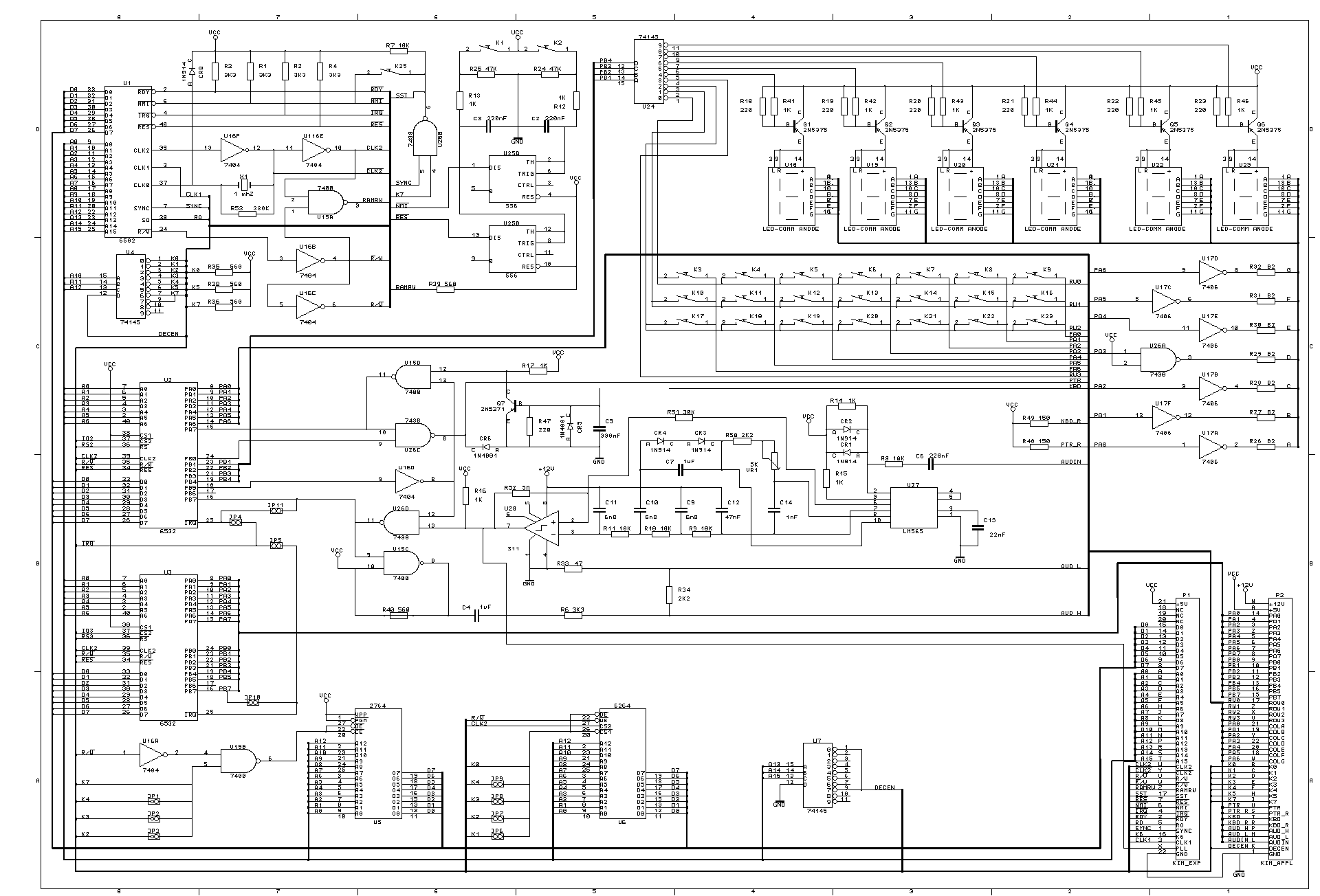
Feeling moved by some of the KIM-1 RetroChallenge entries, I had a thought last weekend: could I design an Apple IIe expansion card that acted as a KIM-1 simulator? The card could contain the address decoding circuitry, KIM-1 ROMs, I/O, and some RAM. Then, the keys could be from the Apple IIe, or maybe an external keypad. The Apple IIe would supply most of the RAM and the 6502 processor (of course). Utilizing the Apple IIe's INHIBIT (/INH) circuit would allow me to disable the IIe RAM and ROM and supply my own from the KIM-1, with out any address conflicts. The idea is so simple, I am surprised it hasn't been tried before. Researching the idea, I came across some schematics for building a modern KIM-1:

After spending some time researching the various ICs and circuits, I noticed an error in the 6502.org schematic. There is no decoder chip to select which of the 6532 RIOT chips is active.

Upon further research, I found Zimmers.net FTP site, with an identical schematic but with a 74LS138 IC in position U9 However, upon further research on the 6532 RIOT there is still a problem. The 74LS138 decoder does not appear to create the appropriate signals to select the correct RIOT's onboard RAM, according to the 6532 RIOT datasheet and KIM-1 memory map (see end of full post for details). I searched around, and found a schematic for the Micro-Kim which corrects the problem with several NAND gates.

I wondered, 'Why decode the address lines just to NAND them back together in various ways'? I made chart of all of the addresses and the bit logic to encode them and I am fairly confident that the 6532 RIOTs can be properly addressed by:

  • using A6 and a new /A6 as the chip selects
  • inverting A7 to make a new /A7 as the RAM select
  • using K5 as the other chip select
  • using A8 as the high bit of the RAM Address (A6) so that we can address all of the RAM on both RIOTs

As a result, we get 2 RIOTs and 256K of addressable RAM with the same basic memory map of the KIM-1. We need a single 74LS04 IC to invert a few of the address signals (which we already need to invert A4, according to the above schematics), and there is no need for the 74LS138 decoder or the 74LS00 NAND IC used in the Micro-Kim.

I created a spreadsheet to list all of the address values and visualize the signals I need.

Friday, January 22, 2016

Watched Steve Jobs (movie)

I watched Steve Jobs, the movie tonight. It was pretty good. It focused on 3 big product launches, with everyone coming to Steve Jobs to wish him luck, reminisce, etc. It portrayed Steve Job's growth as a visionary / CEO (and human being) through large leaps in time, which made the changes all the more pronounced. The acting was quite good, especially from Kate Winslet (who I didn't even recognize at first). Seth Rogan made a more likable Steve Wozniak than the actor in Jobs. The exploration of Steve Job's relationship with John Sculley was much more interesting than the portrayal in Jobs too.

The acting really carried this movie. Not much focus on Apple technology or period settings. This movie could easily be a live play with its very few scene changes, focus on the actors, and 3 act structure. Anyway, not a movie for tech junkies, but very well acted and directed.

Thursday, January 21, 2016

Color Monitor!

I thought I would need to buy a monitor for the Apple IIe, but instead I just re-purposed my daughter's old TV. Finally, games in color, instead of a tiny green-screen! Original Mario Bros, here I come!

Friday, January 8, 2016

Watched Jobs (movie)

For my first RetroChallenge task, I found the movie "Jobs" on Netflix tonight, so rather than be productive, I watched all of it.

Ashton Kutcher was decent. Other than the original Apple, there was not much screen time for Apple technology. The period cars are great - 70's Volvos, Mercedes, Pintos, Camaros, Corvettes, Triumph TR-7.

It was interesting to see the portrayal of Steve Jobs' perfectionism and how unique his personality was in the computer industry. I was surprised at the cold portrayal of relationships between Jobs and Steve Wozniak and Jobs and CEO John Sculley. I think the general tone seemed to portray Jobs as a victim of getting his company stolen from him. Steve Jobs definitely seemed to mellow with age from poor team manager to brilliant CEO.

Not a great movie, but not bad. Worth watching for free on Netflix.

Wednesday, January 6, 2016

RetroChallenge 2016/01 Attempt

So, RetroChallenge 2015/07 was a total flop for me. All I managed to do was go to the beauty shop to find hydrogen peroxide for Retr0brite. I couldn't find what I needed and pretty much gave up on everything. But, January has always been a better month for me to do this. Just a few, very practical goals:

  • Get a color monitor for my Apple IIe
  • Watch and review Steve Jobs, and Jobs
  • Try again to hook up an RS232 WIFI device to an old Macintosh, or maybe the Apple IIe

Sunday, June 28, 2015

RetroChallenge 2015/07 Agenda

July RetroChallenge requires moderation for me, so I will keep my challenges simple:

Monday, February 23, 2015

Reviving an original Macintosh

About a decade ago, I bought an old, neglected and very yellowed original Macintosh from Craig's List for $20. Inside was a Macintosh Plus logic board, but since the back panel had not been modified, the computer would not even close correctly. The analog board worked, but I wasn't going to modify the case to fit the logic board. I have been waiting for a long time to find a 128K logic board to properly fit inside of it.

I got lucky on ebay a few weeks ago and scored a Macintosh 128K logic board with a RAM and SCSI upgrade, as well as a 800k drive and the Mac Plus bracket for the drive. It was advertised as a "Vintage CPU Design Apple Macintosh 128k to Mac Plus motherboard upgrade kit." $75, including shipping from Canada, seemed like a good deal, since I have struggled to get anybody to let go of one for less than $100.

The board arrived about week ago and had the brand "CPU Design" on it. I screwed everything together, and it booted right up. It had 2.5 MB RAM, SCSI, and newer ROMs. The old Mac finally lives!

Click the link below to see lots of photos.

Monday, February 16, 2015

ElWhip 0.07 with New Features

I added some features to the ElWhip web server, some of which are built in to lwip, and some are completely new:
  • Dynamic File Read: The server will read the file in chunks which saves memory and allows much larger files to be in downloaded.
  • Dynamic headers: The server generates the headers now and they are not required in the HTML files. This makes it easier to add images and file downloads.
  • HEAD HTTP method support: The server responds appropriately to HEAD method requests.
  • 'Gentle Quit' in 128K: The application will report an error rather than crashing when trying to quit with 128K RAM.
See the ElWhip Download Page for more details.

Tuesday, February 3, 2015

RC 2015/01 Epilogue

A member of 68kmla.org was nice enough to test out ElWhip on a real Macintosh 128K: ...and a 512K.

First time getting a REAL Macintosh 128K on the internet. So great!

Sunday, February 1, 2015

ElWhip 0.06 Download and Video Finale

ElWhip Webserver 0.06 Download now available.

RetroChallenge 2015/01 Summary:

  • Repaired video on my Macintosh
  • Compiled and modified lwIP Web server to run on Macintosh
  • Wireless logging
  • Modified Mini vMac to run virtual serial ports on PPC Mac OS X
  • Lubricated all of my old Mac disk drives
  • First web server to run on Macintosh 512K
  • First PPP connection, TCP/IP stack, and web server to run on a (virtual) Macintosh 128K

So, a ton of work, but a success, even though it could still use a little work to clean up a few things. Thirty-one years after its introduction, the original Macintosh is finally on the web! This was a great experience and I was able to learn a little too much about the Macintosh Toolbox. This was a bigger project than I expected, and it took a lot of tweaking to get everything running in 128K. Thanks for the motivation RetroChallenge!

Loading HTML files in 128K

I spent most of yesterday trying to track down a nasty bug in the lwIP http server. Most of lwIP is very well coded, and other than the CRLF problem I had, very portable and bug-free. The lwIP http server is a bit of a hodgepodge of code though. Lucky me. Anyway, the callback to release the html file resources happens before the server has sent the TCP packet. As a result, I was free()ing memory before the server was done with it which caused corruption in the HTTP headers. I decided to just keep a file buffer up all of the time instead of malloc()ing and free()ing memory as needed. This was a constraint on the size of file that can be loaded though.

I spent the rest of the night moving more PPP code into a separate code segment that I can unload once the connection is up. It worked so well, I was shocked when I saw 9K of free RAM. This easily left me 4K of RAM to load HTML files. I can even open the menus without crashing. Unfortunately, it crashes on Quit on a 128K because it needs too much RAM to bring down the interface.

So, I will get an upload ready and get a video done in the morning!

Saturday, January 31, 2015

So close...

So I was able to finish the code to load the HTML files from disk using the original Macintosh File Manager calls. This saved quite a bit of RAM, and allowed be to get the server up. However, now it can't allocate enough memory to actually load a file. At least it logs the error gracefully, rather than crashing: PPP Phase Changed to: 8 App Limit: 91260 Free Memory: 9840 Starting Apps. App Limit: 91260 Free Memory: 2768 Error: "Unable to allocate memory for file." at line 105 in :::ports:mac:include:fsdata_custom.c

I am going to keep working on this today. Tomorrow is the Super Bowl, but I might have time to make a quick video, if I get it working.

Monday, January 26, 2015

Fancy Error Page

I worked much of the weekend trying to get the lwIP web server to load files from a disk drive. This could potentially save some memory because the files could be loaded on the fly, instead of all being loaded into memory at once. I had to enable a lot of additional code to get it working, which more than ate up the memory I hoped to save. Anyway, I reverted all of my code changes, and just fancied up the 404 error page that is compiled into the application. So, my Mini vMac virtual 128K is now running a little web server! I'll try to keep it up through the end of the month.

Saturday, January 24, 2015

Macintosh 128K 404 Error Server!

I have been spending a few hours after work slowly trying to conserve memory here and there by delineating parts of the code so that the open and close portions of PPP are in a separate code segment. My thought was I could unload that segment once PPP is up and then load in the HTTP server into the freed memory. This is not working as planned. However, I tried removing most of the HTML pages and the image imbedded in the HTTP server, to see if I was even close on memory usage. I was able to get it serving just a 404 Error HTML Page running in a virtual Mini vMac 128K Macintosh, with just 1K of memory to spare:
404 Error page from virtual Mac 128K. Note Free Memory!
 
Even opening a menu causes a crash.

Memory is so tight that even opening a menu causes it to crash with a 'Memory Full' error code. However, this gives me hope for 2 things:

  • If I load the HTML files from disk, as needed, I could probably save some memory.
  • Segmenting out some more functions could give me enough free RAM to really get this running.
I will leave it running overnight if people want to try it: virtual Mac 128k 404 Error server. I still need to do some hardware modifications to get my original Macintosh back to 128K RAM. I hope I am getting close...

Monday, January 19, 2015

ElWhip 0.05 Download

I had a major disk drive failure on my 512k. My external 800k Drive doesn't spin anymore, and my other 800k drives aren't compatible with 64k ROMs / HFS. That set my testing back a bit, as I went through and cleaned and re-lubricated all of my old disk drives.

Anyway, ElWhip 0.05 is available for download. Instructions are included.

Saturday, January 17, 2015

ElWhip Diet

I have been working on getting my ElWhip web server running in 128K, but I'm not there yet. It is crashing on a 128K Mini vMac right after it negotiates the IP addresses. So close!
The main cause is PPP, which takes up about half of the memory. I tried replacing PPP with SLIP today, but I can't get slattach (SLIP server) to work on Mac OS X 10.4, and it isn't included in newer versions of OSX. So, it's not a good solution. Click for the gory details...

Friday, January 16, 2015

ElWhip Icon

The name of my web server application, "ElWhip" (from 'lwIP'), inspired a Zorro-esqe icon:

'El Whip' would totally be my name if were a Mexican vigilante (or luchador).

It took me a while to remember that I need to set the Bundle Bit ("Has BNDL") in ResEdit for the older versions of the Finder to correctly show the icon.

Web server ran all day today!

Wednesday, January 14, 2015

Mac 512K on the Internet

I fixed a couple bugs this evening, including the netmask problem I was having. I just needed to set the ppp interface as the default interface ( netif_set_default()) and lwip routes all the packets through the ppp interface, even if its router/ppp server is outside the netmask network.

I enabled ip forwarding on Mac OS X to give public access to my Mac: sudo sysctl -w net.inet.ip.forwarding=1, and set up port forwarding on my router.

And so, here it is, on the internet for the first time: my Macintosh 512K Web Server Running System 2.0 and Finder 1.1g (http://72.220.233.84:8080). It is just using the default webpage right now - I need to set up a better one. It seems to work from my iPhone. It is 30 years behind on security updates, so please be kind to the old thing!

Leave a comment if it works for you. I'll try to get a video up this weekend with more details.

Monday, January 12, 2015

CRLF ≠ LFCR

I thought it would be an easy and quick project for last night to go back and properly fix the CRLF problem I was having. Unfortunately, it was not. I spent hours and hours testing the HTTP input string, hex-dumping, debugging, testing, and comparing strings using the lwip's built-in data compare functions. I still could not find what was going wrong. I started losing faith in the lwip code, the MPW complier, the Motorola 68000 processor, all of computer science. Was this really happening? It is getting so late, am I dreaming?

Finally, I double-checked a hex dump on the string to search for: "\r\n" and it reported: 0x0a 0x0d. At first, I thought 'that looks right', but then I noticed that it should be returning 0x0d 0x0a instead! How could it be transposing these predefined character escape sequences? A quick search on google revealed the problem: MPW transposes these two standard escape characters by default. I could't believe it. Of course, it is documented in the Apple SC/SCpp Reference for the MPW C/C++ compiler:

The compiler will by default map \n to the value 10 and \r to the value 13 to conform to the MPW environment. The -noMapCR option will turn off the mapping of the newline to carriage-return and carriage-return to newline.
If you are familiar with Macintosh line breaks (CR only), this makes sense, but if you are familiar with ANSI C code, it does not.

In the context of the lwIP web server, it was erroneously looking for 2 LFCRs, but wouldn't get them until there were 3 CRLFs: CR[LFCRLFCR]LF. Once I regained my sanity, the fix was easy:
/* #define CRLF "\r\n" */ /* WTF? I hate computers... */ #define CRLF "\x0d\x0a"

Compiler character mapping quirks, swapped characters and pulling hair out all seem to be themes in the RetroChallenge.

Saturday, January 10, 2015

Debugging Payoff

My new debugging setup, along with increasing the logging levels in lwip, quickly revealed some of the problems I am having. I managed to tackle a few of them last night.

First, I noticed my lwip ppp interface is not attempting to re-negotiate a connection. So, if it fails the first time, you have to quit the program and start again. This isn't very user-friendly, so I added a timed function to check the ppp status and, if necessary, alert the user and restart the ppp negotiation. This makes recovery from a timing problem much easier.

Next, during a failed connection to the webserver, I would get a warning like: pppos_input[0]: Dropping bad fcs 0xc540 proto=0x21
Basically, lwip was dropping ppp packets. The bad fcs was misleading and caused me some headaches. Finally, I noticed that every time this happened, about 4 lines before the packet was dropped would be a log entry: pppos_input[0]: got 63 bytes Now, lwip ppp reports got xx bytes whenever it gets data from the serial port. It is the 63 bytes that is significant, and was associated with the dropped packet. I happened to retain some information from my book, Inside Macintosh, Vol. II:

Each input driver's buffer can initially hold up to 64 characters, but your application can specify a larger buffer if necessary.
Ah! So, lwip was getting the opening part of a packet, which was cutoff by the buffer overrun, then getting another packet, ending with the checksum. The checksum wouldn't add up, so it dumped the packet (actually two packets). I think it reports 63 bytes rather than 64 bytes because the buffer is a pascal string with the first byte representing the string length(?). Fortunately, Inside Macintosh, Vol. II also provided a solution:
SerSetBuf allows you to specify a new input buffer, replacing the driver's 64-character default buffer.
So, I added a 256 byte buffer and the connection is much more reliable. It even significantly improved the rate of initial ppp negotiation.

Friday, January 9, 2015

Debugging the Debugging

I have been working on a way to get the proper debug logs out of ElWhip without using the modal dialog boxes which cause the program to stall until a user presses the 'OK' button. I have decided to just dump the logging output through the printer port, since I already have serial port code for ppp and the modem port. Unfortunately, that means I would need another serial connection between the Macintoshes. But, feeling inspired by another Retrochallenge project, I set up a bluetooth rs232 adapter for a wireless connection. I initially had a problem where bringing up the serial connection to the printer port would bring down the connection to the modem port, but I worked through a couple of bugs to get it working.

This should make it much easier to troubleshoot some of the intermittent problems I have had establishing the ppp connection and retrieving the web page.

 Wireless Logging with Bolutek RS232 - Bluetooth Adapter 

Monday, January 5, 2015

Virtual Distractions

I had a major distraction last night that kept me up way too late. One of the major limitations of the Classic Macintosh emulator Mini vMac is the lack of serial port realization (is that the right word?). There is a hack at spritesmods.com that includes a virtual tty connection from Mini vMac. The code is for an older version of Mini vMac and has a few bugs that prevent it from working on Mac OS X. This would be a perfect testing platform for ElWhip, if I could get the serial ports working. A lot of troubleshooting got me to here:

Mac Terminal in Mini vMac with tty to host computer

Unfortunately, it won't drain the incoming data until I press a key, so it is often displaying the input a little bit behind the output (eg: you have to start typing the username before the prompt appears). I think it needs a polled function to check for available data. I don't think it will work with ppp as-is. Hopefully, I can figure it out tonight.

Update: That was easy, I re-implemented an unused SCC_Update() function in the main run loop and it works great! Now to test ElWhip on it!

Update: Mind blown:

Elwhip running in Mini vMac with ppp connection to host
No web page though. Going to bed before I create some sort of causality loop. On that note, weirdest thing about Mini vMac: its build environment is a Mac 68k application that runs within Mini vMac.

Sunday, January 4, 2015

Uptime On Old Time Macs

Too many chores to do today, so I just let the web server run on the Macintosh SE, checking to see how stable it is. Running ping -i 60 192.168.11.130 | cat -n from the Mac OS X terminal pings every minute and lets me know how many minutes the TCP/IP stack stays up. It started losing pings around 65 minutes and eventually timed out altogether. This seemed to correspond with the After Dark screensaver on the Mac SE. I turned off the screen saver (and turned down the brightness knob), and the server ran for 174 minutes before I turned it off. There were with no dropped pings and it was still serving the web page when I stopped it.

After that, I ran the web server on the original Macintosh (still with 512K RAM), and had similar success. As far as I know, this is the first Macintosh web server with 64K ROMs or 512K RAM, ever! Certainly the first on System 2.0 and Finder 1.1g.

Saturday, January 3, 2015

Web Serving! - barely

I can serve a web page from the Macintosh SE! There was a problem where lwIP does not seem to be detecting the first CRLF (Character Return + Line Feed) required by the HTTP spec. So, when I used Telnet, I had to hit return 3 times before the HTML appeared. Web browsers will only send 2 CRLFs, then wait. I ended up deleting one of the checks for a CRLF from the code, and it worked! However, that doesn't explain why it isn't detecting the first CRLF. I think it could losing the last character of the buffer (LF) or something.

The process of dealing with this made me realize I can't keep overlooking a few problems I have seen:

  • Getting PPP to connect is too timing-sensitive and flakey
  • I can't always get the web browser to connect
  • PPP is a memory hog
  • I need to actually fix all of the "FIX ME"s I have been inserting into the code
  • I need a better logging / debugging system
Some of these problems are related. I need a good debugging system system before I can fix any of them. Enabling debugging currently causes a bunch of modal dialog boxes to appear. This causes further timing problems and does not allow logging for analysis.

Once I get some of these issues sorted out, I will test it out in 128K and make a download available.

Friday, January 2, 2015

HAKKO, how have I lived without you?!

Repaired Solder Joints
MacMemory Address Decoder Board

My Hakko Soldering station arrived today, and although I had intended on waiting until this weekend to do more RetroChallenge labor, new tools make it hard to wait. Anyway, this thing is amazing. It melted the solder joints so fast, I couldn't believe it. I am used to using dollar store soldering pens - NEVER AGAIN!

My Mac liked it too! Video came back on boot.

In other news, I took a close look at the RAM expansion circuit that was added to my Macintosh to address the additional RAM. I think I can just connect riser Pin 1 and 2 to make it a 128K Macintosh again for testing.

Edit: Actually, I will remove the 47 Ohm resistor too, just in case.

Thursday, January 1, 2015

Macintosh Webserver Recap and Restart

lwIP is a lightweight TCP/IP stack that was designed for embedded systems with, or without an Operating System. During RetroChallenge 2014WW, I was able to get MPW 3.5 compiling programs for old Macintosh System versions, port lwIP, and get a TCP/IP stack running on my Macintosh with 512K RAM. For RetroChallenge 2014SC, I was able to update my working version of lwIP and compile the webserver before life interfered.


I woke up this morning without much of a hangover, allowing for an early start on the challenge.

I updated my local copy of the lwIP source which has now incorporated the ppp-new branch into the main branch. It is nice to see continued development on lwIP. This updated ppp code was important because it allowed for ppp without multithreading, which is necessary for the early versions of Macintosh OS. With git installed, two quick commands did the trick: /usr/local/bin/git clone git://git.savannah.nongnu.org/lwip/lwip-contrib.git /usr/local/bin/git clone git://git.sv.gnu.org/lwip.git

After copying over my additions, and converting the end of line characters to be Mac friendly, I was able to compile it with MPW again.

I fixed the error about the fsdata source file not needed for link. As it turns out, that file is included through one of the header files, and does not need to be compiled separately as a source file.

Finally, I transferred the program to my Macintosh SE for testing (thanks ZIP drive). The PPP and TCP/IP connections come up fairly reliably, but, I couldn't connect to the webpage using Safari.

I Telnetted to port 80:
PowerMac-G4:/Volumes/Mac OS 9/Maclwip151 epooch$ telnet 192.168.11.130 80 Trying 192.168.11.130... Connected to 192.168.11.130. Escape character is '^]'. GET / HTTP/1.0 404 File not found Server: lwIP/1.3.1 (http://savannah.nongnu.org/projects/lwip) Content-type: text/html <html> <head><title>lwIP - A Lightweight TCP/IP Stack</title></head> [...]
And it seems to have worked! I will have to keep testing this evening and look through the code a bit to see why it is not loading with Safari (or FireFox).

I am already further along than RetroChallenge 2014SC!

Saturday, December 27, 2014

Pre RetroChallenge Spending Spree

Macintosh Floppy Emu
Hakko FX888D
Original AirPort Card
To satiate my excitement for the upcoming RetroChallenge, I have resorted to buying stuff for my computers. The idea of my 400k floppy disk drive grinding away every time the web server had a hit concerned me, so I reserved a Macintosh Floppy Emu floppy and hard disk drive emulator for vintage Macs. A new batch is expected mid January.

While browsing around that website, I noticed a review for a Bus Pirate interface. I remember seeing these on hackaday a while ago, but I didn't realize you could buy them on ebay now. So, I got one.

Since I need to do some soldering on the original Macintosh, I decided that the dollar store soldering iron wasn't good enough, so I splurged on a Hakko FX888D-23BY Digital Soldering Station.

I bought a $3 Airport card for my G4, just for the heck of it.

Because my Inside Macintosh book made for some interesting reading, I bought the Apple publication Designing Cards and Drivers for the Macintosh Family.

RetroChallenge, please come quickly before I spend all of my Christmas money!

Sunday, December 21, 2014

Retro Prep Problems

Macintosh analog board connection cable
The analog board connection cable.


Macintosh analog board connector solder joint
The top and bottom large solder joints are suspect.
I had some free time this weekend to make sure all the retro Macs were working before the start of Retrochallenge 2015/01. The G4 booted up as expected (I use it semi-regularly). The SE booted up as expected (it has proven very reliable). The original Macintosh booted up, but there was no video. I could tell it was limited to a video problem because clicking the mouse around would cause some disk activity.

I opened the computer up to investigate, but I didn't see anything obvious. I started it up while open (DANGER!) and noticed that slight pressure on the analog board connection cable would cause the video to come back temporarily.

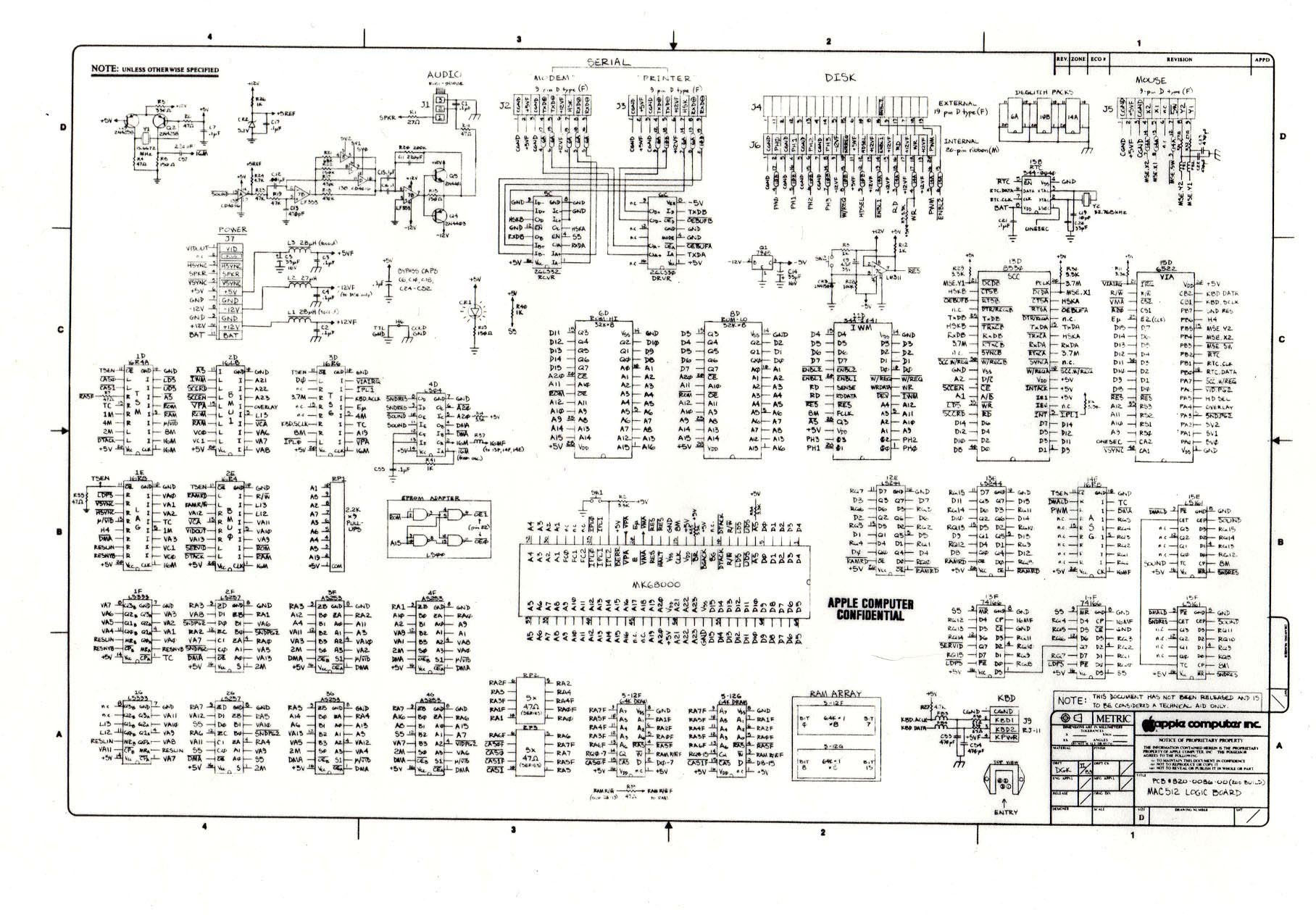
I looked closer and noticed a questionable solder joint which seems to correspond to video out, according to this Macintosh Schematic (J7, pin 1, VIDOUT).

I'm not sure I will have time to fix it before January, but it looks like it might be an easy fix.

Tuesday, December 16, 2014

RetroChallenge preparation

I recovered from the hard drive crash pretty well. I was able to make a disk image of the slowly dying drive, which I restored onto a newer drive. Fortunately, it retained all of my licensing information for the Adobe Creative Suite I have installed. I don't think the Adobe CS2 registration servers work anymore, so that would have been a real pain.

The Dual processor PowerMac G4 with Mac OS X Tiger is a real joy to work on, even though it is now 15 years old. The user interface is far more appealing than OS X Yosemite, and compiling programs proved quite snappy. The Mac OS 9 compatibility mode is nearly flawless. Plus, parts are dirt cheap for the old G3 and G4 towers.

On that note, I just received a new (to me) Belkin F5U220 USB 2.0 card to replace the old USB 1.0 card which temporarily replaced the OrangeMicro USB Firewire card that would crash on wake with the G4. It works great, and only $10.

No more excuses to not backup my drives!

Monday, December 15, 2014

Early Christmas gift: Fire in the Valley

Early christmas gift from a thrift-shopper friend. First edition!

Monday, December 8, 2014

Hard Drive crash!

I have already had a major setback for the RetroChallenge. While getting things organized, my hard drive started clicking and slowing down. Unfortunately, I backed up the wrong drive. By the time I figured out which drive was making the noise, it was too late to backup.
I ended up putting it in the freezer for a while and had a few error free minutes to get the most important stuff off. After tightening up the screws on the top and sending it in and out of the freezer, it seems to have shaped up considerably though, but it is running very slowly. I am now backing up the entire disk which, by the progress indicator, will take several days. So, at least there is some hope.

Tuesday, December 2, 2014

Retrochallenge 2015/01 Entry

Retrochallenge is back!
I seem to be able to get more done during the Winter Warm up than the Summer Challenge, so I am feeling ambitious. I still want to get a web server working on my Mac 128K, so that is my primary goal.  I have renewed my interest in working on my 1991 Nissan, and interfacing with the ECU using the Nissan CONSULT protocol.  It is a JECS microprocessor which is either a Motorola 6802 or Hitachi 6303 equivalent. It isn't the typical retro computer, but it seems to qualify.

Thursday, July 31, 2014

Slow End

Between work, vacation, having my car stolen, recovering it myself (long story) and working on my new (to me) car, I haven't done anything on my RetroChallenge entry. Total retro Macintosh failure.

I did spend some time working on the car I bought, specifically the computer and sensor system. It is 1990 Infiniti Q45, so its computer system technically qualifies as retro, I guess. The previous owner had put a piece of black tape over the diagnostic information display to hide the "STOP LAMP INOPERATIVE" error. Unfortunately, that was one of the most minor abuses that he put this car through. Anyway, a few minutes of soldering on the stop lamp sensor to fix some damaged solder joints, and I was greeted with "OK"!

It actually took less time to fix the sensor than to open up the dash and get the black tape off!


So that's it. I compiled the new lwip code, made an application, but never tested it, and made my old car computer say "OK".

Sunday, July 6, 2014

Slow Start

Between 4th of July, World Cup, and the British Grand Prix, I haven't spent much time on my RetroChallenge project. I spent way more time reading about other people's projects than working on my own! I did manage to compile the latest lwip sources and the lwip httpserver into an application, but I haven't tested it yet. The MPW build option to use unix #include paths worked perfectly.  I wish I had know about it last time around, as it would have saved me some time.
SetDirectory "{MPW}Maclwip2:lwip-contrib-ppp-new:ports:mac:"; BuildProgram ElWhip # 2:50:02 PM ----- Build of ElWhip. # 2:50:02 PM ----- Analyzing dependencies. # 2:50:02 PM ----- Executing build commands.   SC [...]   Link -o ElWhip [...] ## Link: Warning: File was not needed for link: (Error 52) :::apps:httpserver_raw:fsdata.c.t.o   Rez -rd -o ElWhip ElWhip.r -append   DeRez "Mac OS 9:MPW:Libraries:Libraries:SERD" -only SERD   Rez -o ElWhip -append # 2:51:51 PM ----- Done. ElWhip The warning about the file not needed for link is troubling because that is where the html for the web server is stored. I will test it all out tonight.

Monday, June 30, 2014

Making an lwip web server

Looks pretty easy:
http://lwip.wikia.com/wiki/Sample_Web_Server
although the nonstandard file system seems weird.

Both the lwip core and the ppp-new branch have been updated since January, so I will try to update them first. Also, I will try to use the MPW compiler flag for using Unix paths.  I had no idea this existed when I ported the code in January. Hopefully, this will make my implementation standard enough to include in the lwip contributions branch.

Also, I did some research on how I can test the web server with 128K of memory (rather than the 512K my computer was upgraded to).  It looks like I can just solder a jumper to disable one of the RAM address lines, making it 128K.

Thursday, June 26, 2014

Spending Spree, part 3

Since I was never able to get the ethernet card working on my Mac SE during the last Retrochallenge, I decided I need a better way to transfer files than a serial terminal and ZModem. So, I bought an internal Zip drive on ebay. Adding it to the G4 was cheap and easy.  I am still using an old SCSI Zip drive to boot my Mac SE and my Mac SE/30. These drives are great, and I have never had any data corruption, even after long periods of storage.

Saturday, June 21, 2014

Spending Spree, part 2

Earlier this year, I took a chance on buying one of these poorly documented Chinese BOLUTEK RS232 / Bluetooth modules. I followed these instructions, and to my surprise, it worked great for a basic wireless serial terminal between my G4 (with USB Bluetooth adapter) and Mac SE. Hopefully, I can use it to establish a wireless PPP link to my Macintosh 128k. First, I need to re-solder my broken RS422 to RS232 adapter, though. Wireless internet, here I come!

Oh, and the Fanny Mac arrived already. It fits and works great!

Wednesday, June 18, 2014

Spending Spree

Just bought a fan on eBay for the Mac. I figured that if I will be leaving it on for 24 hrs a day for a month, this is a necessary purchase. The fans for these Macs are expensive on eBay, especially the "Kensington System Saver". Fortunately, I found this "Fanny Mac" on sale.

Tuesday, June 17, 2014

RetroChallenge 2014SC Intro

I won't have all of July to work on the RC 2014 SC, so I will try to keep it manageable. Building off of my RetroChallenge 2014 Winter Warmup Project, I will compile a web server for the original Macintosh 128K. I may need a few hardware upgrades (like a fan) to keep this going. In the unlikely event I have some extra time, I will get soldering on my Standalone Apple IIe Disk Emulator.

Tuesday, February 18, 2014

Hello 1985!

ebay order just arrived:
Inside Macintosh Vols I, III, III
Inside Macintosh Vols I, II, III. $75 new, $4 used!

Saturday, February 1, 2014

RC2014WW Wrap-up

ElWhip on 512K Macintosh running System 2.0 and Finder 1.1g
ElWhip application and basic instructions are available for download!  Unfortunately, I didn't have enough time to add any really useful functionality.  A web server would be relatively easy to add and would give the application some real purpose.  All it does is respond to pings and run a telnet echo server.  Also, I'm not totally sure it will run on a real Macintosh 128K, since I found out that I don't have one.  I included a really stripped-down version that will probably run in less than 96K of available memory.
This was a fun exercise, and it is my very first classic Macintosh application.  If anyone gets it running or needs some tips, leave a comment!
I will try to take some time tomorrow to get a final video posted.  Until then, take some time  to check out the other RetroChallenge entries.

Friday, January 31, 2014

Last Minute Changes

My menu and window drawing problems turned out to be a bug that was only revealing itself on the virtual Mini vMac Macintosh 128k. I'm not sure what it was, but it disappeared when I spent some time cleaning up the Mac specific code last night. So, the menus and dialogs all work. I need to do some final testing tonight and I will get a download available!

Monday, January 27, 2014

Fighting with MPW

ElWhip application with empty menus on 64K ROMs
I spent Saturday trying to get lwip to load on a virtual 128K with 64K ROMs. I think I managed it by building a program with no user interface or feedback at all. I can't test it though because Mini vMac doesn't link to a real serial port or tty. Anyway, with a limited user interface on the 128K, I can run PPP and ICMP (eg: ping), but not TCP. I set it up so it will load as much as it can, then provide an error if it cant load the next module/protocol (rather than a hard crash).
I spent the rest of the weekend trying to get a simple interface programmed for the application. Unfortunately, MPW versions 3.0 to 3.5 do not seem to be able to generate menubar or window resources that a Macintosh with 68K ROMs can use. The menus are there, but they just show up as white blocks (see screen shot above). I don't think I can figure out a solution in time, but at least command-q actually quits the application now. Good enough.
Mini vMac has been great for testing just to make sure the program basically works. I will spend the last few days testing on my real Macs and getting a download together with all of the required licensing info for PPP and lwip.

Saturday, January 25, 2014

Happy Birthday Macintosh!

30 years old and still no TCP/IP. I think I am getting close, but there is a lot of code to trace through to make sure I segment everything properly and load everything in the right order to keep the memory footprint low, and avoid segmentation of the memory. I have reserved a few hours this weekend to work on this, so hopefully I will make some progress.

Monday, January 20, 2014

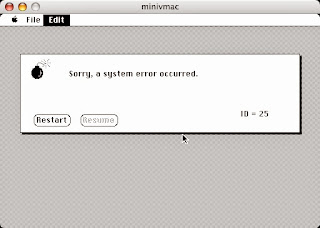
Too Big!

Sorry, a system error occurred. (Restart) (-Resume-)

Uh, oh. I wanted to make sure my lwIP application would work on a real 128K Macintosh (I discovered mine was upgraded to 512K), and none of my old Macs have just 128K RAM. So, I recompiled Mini vMac to be a 128K Macintosh, rather than the default Macintosh Plus. After it starts PPP, it gives a system error ID=15. This is a segment loader error, which probably means it is out of RAM trying to load the lwIP core.
In better news, I eliminated most of the debug messages so I don't have to hit the enter key so many times to dismiss the debug dialog boxes.

Saturday, January 18, 2014

Success and Video Update


Got it! Hitting the enter key rather than clicking the mouse on the dialog boxes makes the connection. That's either a timing or mouse port serial interrupt issue. Oddly, the return key doesn't do anything. I have TCP/IP networking on my original (modified) Macintosh! I think the memory use is low enough, it should work on a real 128K Macintosh. Is it pronounced "El whip" or "l.w. I.P."? I like the Mexican flair of El Whip! (Actually, it's pronounced "lightweight IP" - boring…)

Old System Success, and Old Hardware Fail

Macintosh -192 error: resource not found
My lwip application seems to run fine on System 2.0 and Finder 1.1g on the Macintosh SE. That's great because that is probably about the maximum system version that the Mac 128K can run. Unfortunately, the Mac 128K gives the above error when opening the serial port.

Wednesday, January 15, 2014

Pre-System 7 software from MPW 3.5

lwip PPP IP address dialog in Macintosh System 6.0.8
lwip PPP IP address in System 6.0.8
I spent way too long the last couple of nights trying to get MPW to build an application that could be run on pre-System 7 (even System 6.0.8). I tried using MPW 3.1 (System 6 only) and MPW 3.5 (System 7.1 - Mac OS 9) in different ways to get it to work. Here were all of my attempts and results:

Monday, January 13, 2014

Detour - RetroChallenge 2014SC ?

I saw this Apple II prototyping card on ebay tonight and HAD to buy two. These haven't been available for a while. I resorted to buying an IBM XT prototype card in the past which is bigger but has the same trace spacing on the slot connector. I have never gotten around to actually making an Apple II card though. This looks perfect for some future project.

Sunday, January 12, 2014

MakeFile Overhaul

Tonight, I investigated how to fix the issue of the Main code segment being too large for a normal build/link without using --model far which may be causing compatibility problems. There is a #pragma segment segname directive that I thought could work to break up the segments. However, every function needs a directive before it to put it in a segment! That would require way too many code edits. After some research, I found out that MPW's compiler will also take a -seg segname option to assign the object code to the specified segment name. This is the way to specify a segment for an entire source file.
After reading a bit of Building and Managing Programs in MPW, I realized my Makefile is not using any of the complex features available in MPW. So, I incorporated some path constants and Directory Based Dependency Rules, and eliminated a lot of the hard-coded paths and dependencies in my make file.
I figured out that the key to using Directory Based Dependency Rules and code segments in the Makefile is to add a modified extension to the list of object files you want to put in a separate code segment. Then, add a new default build rule for that extension. Code segments are way easy now! I can now remove the --model far option which seems like it might be incompatible with older Macintosh System versions. The main segment with the PPP interface comes in about 31K and the rest of lwip is just 28K, each fitting nicely in a code segment.
Here is an example section of an MPW Makefile (new extension in yellow and segment name option in blue): ObjFiles-68K = "{SrcDir}ip_frag.c.o" ∂ "{NetISrc}etharp.c.n.o" ### Default Rules ### {NetISrc} ƒ {NetISrc} {PPPISrc} {SrcDir} ƒ {CoreSrc} {IPV4Src} {APISrc} .c.o ƒ .c {•MondoBuild•} {C} {depDir}{default}.c -o {targDir}{default}.c.o {COptions} .c.n.o ƒ .c {•MondoBuild•} {C} {depDir}{default}.c -o {targDir}{default}.c.n.o {COptions} -seg NetIf

Wednesday, January 8, 2014

Motorola 68000 uses 32 bit addressing. Don't forget it!

Fixed the not enough space for new header size error.
For some reason, I thought the 68K processor was 16-bit, so I told lwip a pointer uses 16 bits in the cc.h header file. (It has a 16 bit data bus, 24-bit external address bus, but is 32 bits internally.) Now, you would think I would have figured this out after using 32-bit addressing to get past the previous link error. Or, maybe I would have looked at the lwip cc.h for the coldfire processor, which is a 68K at heart. Or, maybe I would have read the Apple SC/SCpp Reference more thoroughly the first time around. Anyway, MPW for 68K uses 32 bit pointers.
Quick fix to the code:
typedef u32_t mem_ptr_t;
And... no assertion errors at run-time! It still isn't completing the PPP negotiation, but it is trying so hard: PowerMac-G4 pppd[777] <notice>: pppd 2.4.2 (Apple version 233-0-8) started by epooch, uid 0 PowerMac-G4 pppd[777] <notice>: Connect: ppp0 <--> /dev/cu.usbserial PowerMac-G4 pppd[777] <error>: Received bad configure-ack: 02 06 00 00 00 00 05 06 bf 68 ca 18 07 02 08 02 PowerMac-G4 pppd[777] <warning>: IPCP: timeout sending Config-Requests; PowerMac-G4 pppd[777] <warning>: acscp: timeout sending Config-Requests; PowerMac-G4 pppd[777] <notice>: Connection terminated.

Saturday, January 4, 2014

Killing Bugs

MacPaint on Macintosh System 2.0
ZTerm on System 7.1

Click "Read more" for details...

Friday, January 3, 2014

Link Error with PPP

I realize that posts about porting code must horribly boring to read. However, the boring details will hopefully help someone who attempts some similar feat of folly. As a result, I will try to post a picture or two of a Macintosh or Mac GUI element that summarizes my progress. The details of which can be read by clicking the "Read more >>" link at the bottom of the post. First installment:
Before:
16-bit addressing can only reach 32K of code.

After:
32-bit addressing can access many more K of code!

Thursday, January 2, 2014

Sibling Rivalry

Macintosh SE harassing sad Macintosh 128k for lack of internet connectivity…

Wednesday, January 1, 2014

Importing and Porting

The ppp-new branch of lwip is available for download here: lwip-ppp-new.tar.gz . Of course, I couldn't find the zip download at first, so I had to download git, compile and install it, then check-out the ppp-new branch of lwip. Oh well, now I have git installed.

In 2006, according to my old makefile, I tried to port lwip to the Mac OS, but I had no luck. I did a lot of hand editing of source code files to convert them to Mac paths and line-feeds. So this time, I took a few hours to write a short MPW Script to fix the line-feeds and paths of all of the source files at once.

I just realized the MPW compiler has an option -includes unix which solves the path issue. Oh well, at least I don't have to worry about the line-feeds.

So the lwip code is Macified, I just need to set up the architecture specific options and write a program to use it. I have a feeling I will have a lot more "Oh well"s in my future.

Tuesday, December 31, 2013

Setting Up the Work Environment

I couldn't wait any longer! I dusted off my Macs and booted them all up to make sure I wouldn't spend the whole month fixing hardware. They all work!

Mac G4, 128K, SE

Hardware

Basically, I will be using a PowerMac G4 to do the software development and the Macintosh SE for initial testing. I decided to do testing on the Mac SE for a few reasons:

  • faster serial ports for data transfer;
  • ethernet card installed (broken?);
  • MacTCP and FreePPP installed for comparison testing;
  • SCSI port and a harddrive;
  • more robust System software (System 7.1);
  • same Motorola 68k processor as the 128K.
This should make testing much less painful. If I get anything working on the SE, I can give it a try on the Mac 128K. I have an external SCSI zip drive that seems to work well as an external harddrive (and lots of zip disks!).

Sunday, December 29, 2013

Gearing up for RetroChallenge!

These beauties just came in the mail:
Why buy one when you can buy 10 at 10 times the price? $20 on ebay seemed like pretty good deal. I've had good luck with zip drives. They are easy to find at thrift stores, and protocols span from SCSI to ATA to USB which makes them good for data transfer between old and new systems. They work great as a boot drive for classic macs (back to the Macintosh Plus) and let you organize a lot of data in a small space. I've had enough CDs fail that I actually prefer these guys for long term storage of retro software.

Wednesday, December 4, 2013

RetroChallenge 2014WW Entry

I have again entered the RetroChallenge! This time I will be using my Apple Power Macintosh G4 500 DP from the year 2000 to compile some programs. Now, even though this computer is technically eligible for the RetroChallenge, the real "retro" part is that the program I will be compiling is for the Apple Macintosh, as in, the original 128K Macintosh from 1984. I will be using the Classic Environment of Mac OS X 10.4 running MPW as my development environment.

As for the programming, I will attempt to port the lwIP TCP/IP stack to the original Macintosh. This Macintosh is unique because it did not have enough memory to run any commercially available networking stack. Even the 512K Macintosh had some networking possibilities. I attempted this project a number of years ago but couldn't get past the multi-thread requirement of the lwip PPP implementation. As far as I know, the original Macintosh operating system does not have any multithreading libraries or routines. I recently noticed that a branch of the lwIP code includes a PPP module that claims to not require multiple threads! So I will give this another shot. If PPP fails, I can try to get SLIP working instead.

Here is my target hardware/software flow:

Macintosh -> lwIP -> ppp ->  RS-422 -> RS-232 -> USB -> PowerMac G4 -> getty -> pppd -> THE WORLD!

Having worked on this before, and having struggled to understand how to use the code, I have a feeling I will get stuck at some point. If that happens, I will probably work on building a ROM burner to flash some Apple II ROMS or work in my Apple IIgs.

Saturday, November 23, 2013

RetroChallenge 2014WW Prizes

Not totally sure what I am going to do yet, but I am definitely offering these items up as prizes:

I can't guarantee that the keyboard still works, but it did 5 months ago!