Monday, November 5, 2018

64K 4164 DRAM Decoding Integration

I integrated the 4164 DRAM decoder wiring into the logic board this weekend. It was very difficult to troubleshoot, and on retrospect, I think an adapter board would have been easier and less problematic. The main hangup was that the A14 signal to pin 10 of the J1 socket is connected on both sides of the logic board. One side in from expansion slot 7, and the other side goes out to H1 socket which creates the (A14&A15) signal. I had routed the (A14&A15) back to the J1 socket to decode the upper 16K of RAM. After disconnecting the A14 line from pin 10 and re-connecting pin 10 to a new video decoder signal (HIRES&PAGE2), the video decoder signal was getting sent through to H1 to give (HIRES&PAGE2&A15), which is wrong and caused computer to not be able to access the ROM.

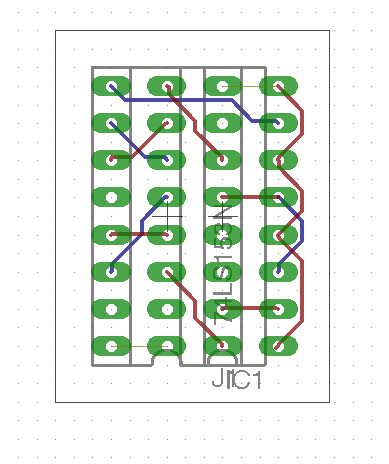
Anyway, I fixed the problems and 74ls153 now sits in the J1 socket like it was always supposed to be there. The signals to decode the upper 16K of memory in the 4164 DRAMs are now available. I need to build circuit with registers to set to enable the upper bank and bank switch the 4K that overlaps the I/O area of the Apple II+. It will basically be 1/2 of an Apple 16K RAM/Language card.

Tuesday, April 24, 2018

PPP server on ESP32

I spent some time working on my Wimos Lolin ESP32 this weekend. I recently wrote up a simple how-to about the ESP32 device on my other blog. Since I am pretty familiar with lwIP and PPP based on my work on the Macintosh 128k webserver, I also previously contributed a small amount of code to enable the PPP server in the lwip network stack that the ESP32 uses. But, without an interface to access the PPP server code, it was useless. So, I decided to integrate access to the PPP server into the ESP32's standard AT command interpreter. With a small amount of code, I think I have it working! My MacBook can connect to itself using PPP now. I need to get one of my classic macs set up to further test the connection. I should get code posted in the next few days.

Update!

Source and instructions are now on github!

Wednesday, April 18, 2018

Apple II "The Keyboard Company" Keyboard Repair

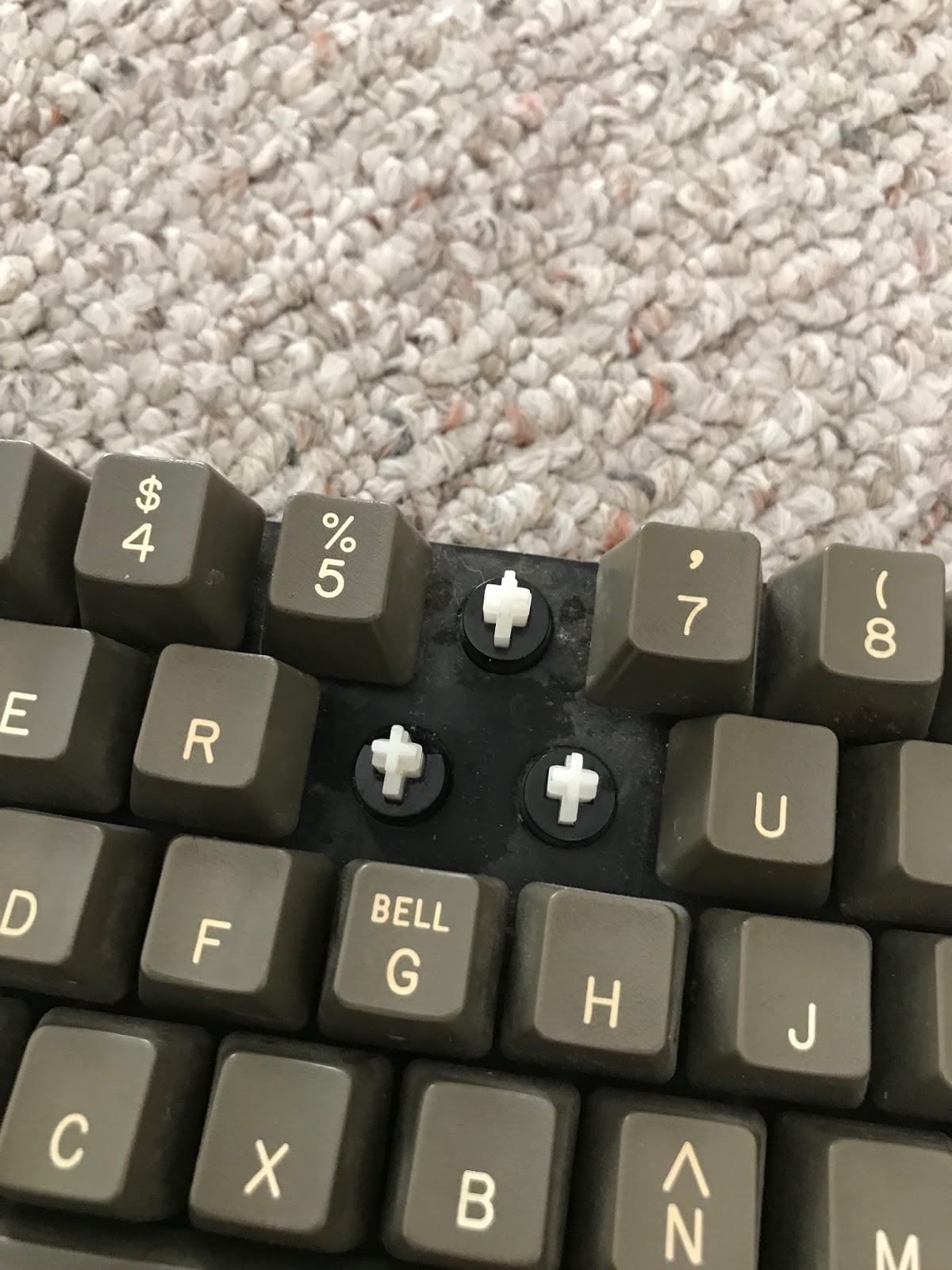
During my recent move, one of my Apple II+ computers didn't fare so well and broke 2 key posts. I really don't like the keyboard in this particular computer: it sticks, it often misses key strokes, and the feel is not very good. I didn't know how different the keyboard was until I took it apart and found... no Alps key switches! But, since Apple II+ keyboards are not cheap, I paid a few bucks for replacement key posts instead of replacing the keyboard. Process:

  1. Unscrew and remove the base plate of the computer
  2. Unscrew and remove keyboard
  3. Unscrew a bunch of tiny screws to remove the circuit board from the keyboard
  4. Push the broken post out the back
  5. Push in the new post
  6. Reassemble
  7. Continue hating how the keyboard feels

One repair completed!


Weird spring / contact matrix
I tried to repair the posts, and the one on the left worked OK, but I ended up replacing both of them.
6 and T are fixed!

Wednesday, April 11, 2018

Retro Loft Progress

One of my big RetroChallenge goals was to get my office organized after recently moving. However, I decided to just move everything to a storage loft in the house and add a workstation to get everything out of the way.

I spent last week working on a sketch of what it would look like and this past weekend doing some construction:

RetroLoft - Desk Area SketchUp
RetroLoft - SketchUp
RetroLoft  - Before
RetroLoft - Before
RetroLoft - In Progress
RetroLoft - During
RetroLoft - Desk Area

I installed a hand rail, moved the storage shelves over, installed a desk support, and more storage shelves. I used some old shelf standards I had on-hand and discovered that shelf standards are not 'standard'. The two sets had slots that were not quite aligned the same way. I still need to install the desk surface (an old interior slab door), then run a new power line, and set up some old computers. Its a little warm up there, but a large fan in the garage keeps the air moving now.

Monday, April 2, 2018

Parts!

Lots of parts have come in for RetroChallenge.

Tuesday, March 13, 2018

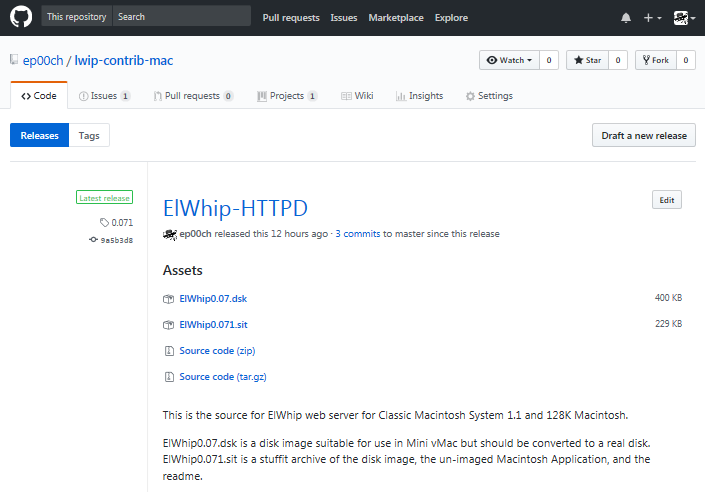
ElWhip is on GitHub

I uploaded my source code for ElWhip onto GitHub. Unfortunately, there are still some files that have Macintosh line endings, so some of the code can't really be viewed on GitHub unless you hit the "Raw" button. Hopefully it will inspire somebody to make a web browser for the original Macintosh. It will also make updates and additions to the code easier for me. Now that it is uploaded, it should make adding a log/status window quite a bit easier.

Tuesday, March 6, 2018

RetroChallenge 2018/04 entry!

It is that time of year again, again! RetroChallenge!

My objectives, by priority:

  1. Organize my office with old computers and identify stuff to eliminate.
    • Give away/sell computers that don't fit with my retrocomputing goals.
    • Set up an imaging machine and get all of my 800K and 1.4M disks transferred to images on Zip Disks
    • Sort through 400K disks
  2. Repair some damaged Apple II+ parts.
  3. Get ElWhip source code uploaded to GitHub.
  4. Test out an ESP32 (new version of ESP8266) as an internet modem / PPP server for old Macintoshes.
  5. Test out an ESP32 as virtual serial port for Apple II.
  6. Add SmartPort compatibility into a2usbdsk.

Thursday, January 11, 2018

a2usbdsk mostly working on Raspberry Pi!

After much experimenting, I figured out that an unusually low usb timeout setting was causing usb transfers to stall on the Raspberry Pi. After I raised that, I was able to easily load disk images! Unfortunately, Karateka does not work. During the boot sequence, Karateka does a very quick jump from track 7 to about track 27. It is cycling the Disk ][ phase lines very quickly to make this happen. Unfortunately, I don't think the Raspberry Pi Zero is currently able to sample the USB data fast enough to keep up. As a result, it is only jumping to track 15 or so. I was having a similar problem in earlier versions of a2usbdsk. I tried some tricks to speed things up, to no avail. But, good news is:


MOONPATROL!

So, as a proof of concept this is looking good. I should be able to move on to step 2 and get this running on the Raspberry Pi's native SPI port.

Tuesday, January 9, 2018

a2usbdsk not working on Raspberry Pi yet

Although my Apple IIe Platinum was not working correctly, I remembered that the color pattern I was seeing was actually a self-test mode that the Enhanced Apple IIe goes into without a keyboard connected. My keyboard was connected, but was also shattered and seriously damaged. Fortunately, another Apple IIe keyboard saved the day.

Unfortunately, a2usbdsk on the Raspberry Pi is not able to send data fast enough for the Apple IIe to read... yet. I have some code optimizations I need to test out which I think may help the situation. That said, even my old MacBook air was barely able to keep up. My newer 1.8 GHz dual-core Intel Core i5 MacBook Air seems to have no problem. I'll keep trying this weekend.

Update!

The Raspberry Pi is able to keep up! The problem is that the FT232H is stalling very often. I had this problem early on in the development of a2usbdsk on Mac OS X, but I worked around it by writing most of my own read/write loops and avoiding libmpsse for the most part. There must be some difference in how libusb or libftdi is handling the packets on the two operating systems. By frequently purging the buffers, I was able to get a disk to load! Need to find a better solution though. More testing should narrow down the problem.

Thursday, January 4, 2018

a2usbdsk ported to Raspberry Pi

I was able to port a2usbdsk to the Raspberry Pi quite easily due to it being based on libusb and libftdi. Really, I just had to set up a makefile. I had some issues getting it to open the FT232H though. libmpsse does not return any errors when attempting to open an FTDI device. This makes troubleshooting very difficult and frustrating. After adding some logging, I determined that the libftdi function ftdi_usb_open_desc_index() was returning error code -8, "get product description failed". Getting the product description is a pretty simple function and that error was not appearing on Mac OS X, so it left me baffled for a while. In the end, the issue was that Raspberry Pi/Linux strictly controls who can access USB devices. "sudo" got it running, but setting up a udev rule seems to be a better solution.

I have not tested this with a real Apple II yet, as my Platinum Apple //e was pretty much destroyed in a recent car accident due to air bag deployment. The case is shattered, but it may still work. I'll try this weekend.

Monday, January 1, 2018

Raspberry Pi A2-SPI-DSK

I received my first Raspberry Pi in the mail today. It is a Raspberry Pi Zero W. I am excited to really try it out. I have it running, but I need to get a USB keyboard and mouse hooked up to get everything installed.

The Raspberry Pi is pretty neat hardware that bridges the gap between a micro controller and a full desktop computer. I have done some micro controller development, but never got really engaged with it. Development on the Raspberry Pi looks a little more my speed. At $10 for the Raspberry Pi Zero W, it is significantly more powerful and cheaper than the Mega AVR Arduinos and the necessary add-on cards. Most of the cool stuff is already built in to the Pi!

So, my hope was to port a2usbdsk to Raspberry Pi, so that people never have to use 5.25" disks again. I love the nostalgia, but they are cumbersome to use and ADTpro transfers to and from the Apple II are fairly slow. Don't get me wrong, ADTpro is a wonderful piece of software that I have used and quite a bit myself. But if you don't want to actually use disks to use disk images on your Apple II, it seems like the wrong solution, and a piece that is missing in (and could easily supplement) other packages like Ivan Drucker's RASPPLE II.

To pull this off, I am going to attempt it in 2 steps:

  1. Port a2usbdsk to Raspberry Pi to run the FT232H adapter;
  2. Create a new program a2spidsk to run on the native SPI ports on the Raspberry Pi.

I am very concerned that the Raspberry Pi may not be able to analyze the incoming data fast enough from the USB adapter. There is quite a bit of latency between transmissions to the disk drive that I was barely able to overcome on my MacBook. This puts a long gap between sectors which the Apple II is pretty good about ignoring, but it will eventually give an I/O error.

I am also concerned that the SPI buffer for the bcm2708 in the Raspberry Pi is quite small (12-120 bytes) which could make it difficult to output the bytes fast enough and with the regularity needed by the Disk ][ interface card. Since the Disk ][ interface card doesn't really understand SPI, we need very regular SPI clock transitions and data to keep synced up with the card in order to match up the synchronous SPI bus to the asynchronous Disk ][ interface card connection.

Tuesday, December 19, 2017

Demo Video of a2usbdsk in a Apple II build and deployment pipeline

The build pipeline is an update of Jeremy Rand’s Apple2BuildPipline based on Quinn Dunki’s project of the same name. Using this allowed me to stop reinventing the wheel and focus on finishing coding my a2usbdsk tool. Definitely check those projects!

Retro redux: a2usbdsk Release

RetroChallenge 2017/10 is way over and I got sidetracked about half-way through. Way too much IRL stuff got in the way. However, I have had a little bit of time recently to try and finish off my project. Upon reviewing my A2-SPI-DSK tool, I noticed some problems in my code. It was causing some serious issues with getting it to compile and work correctly. I guess that’s one of the issues with trying to write that much code in a month.

Anyway I’ve had some time recently to get things working, and completed the a2usbdsk v1.5 tool (Download). It now works perfectly to get a virtual disk to a real Apple II via USB. In addition, I added support for a second drive. I was so happy to see it boot a disk again! It is still read-only, but I have some ideas for that issue.

So, if you are developing Apple II software, you can write it in Xcode with cc65, then when you build it, just add a line to your makefile like: /usr/local/bin/a2usbdsk -1 $(PGM).dsk

This will mount the disk image and make it available to your Apple II over USB via the A2-USB-DSK. The A2-USB-DSK is easy to build using the schematics below and a CJMCU-232H FT232H module available on eBay for less than $10. Total build including the other ICs and a proto-board should be in the $20 range.

I created a branch of Jeremy Rand's Apple2BuildPipeline project to showcase how it works in a real project. Hopefully I can get a video up in the next few days.

Thursday, October 12, 2017

DSKalyzer doubts

Hmm,I have been playing with DSKalyzer, and as great and as powerful as it appears to be for organizing your disk images, I don't think it can create a new one. That is sort of important for making a clean build for a new program. AppleCommander can do that nicely though. I may just stick with AppleCommander in my a2bdp Apple 2 build/deployment pipeline for now. It will make my project a little easier, too.

Tuesday, October 10, 2017

Some AII-SPI-USB problems resolved

I was having some serious issues getting my AII-SPI-USB command line tool (for transferring disk images to the UM232H) working on my newer MacBook. I tried rebuilding it, then rebuilding libftdi, and libusb, and libmpsse. I finally got things working and Xcode asked me to update my build settings. Then, of course, nothing would work again. The primary problem was "duplicate symbol" errors that were suddenly popping up. Some edits to libmpsse, and some changes to my code, and I finally was able to re-build it. I think I should staticly link the libraries I need for the tool, since most users won't have the will power to compile libftdi, or libusb to use it.

I need a new name for the program too. AII-SPI-USB is not a very posixy name for a command line tool. Maybe a2usbdsk.

It's ironic that one of the benefits of programming for retro computers is that the hardware or operating systems almost never change. Do it once, and it works forever! Not so for modern hardware, even the modern hardware interacting with the retro computer.

More AII-SPI-DSK problems

Found my AII-SPI-DSK adapter on the breadboard. Unfortunately, the counter was harvested off of it for some other project. Now I need to track down a 74LS161 ic...

Monday, October 9, 2017

AII-SPI-DSK problems

I downloaded my AII-SPI-DSK program and tried to get it running without success. First FTDI library version errors, then a file not found error. I need to get the adapter out and try again. Unfortunately, it is packed away since I am moving this month. But I think I should be able to dig it out today.

Saturday, October 7, 2017

Trying Existing Virtual Build Pipeline

To get started building an Apple II program, I used some existing resources to make sure my installation of cc65 compiler is configured correctly. Two resources: The BLONDIEHACKS web site conveniently provides an example Apple II build Xcode project to start from. Unfortunately, I had some build errors. The solution is to edit the example's Makefile to specify cc65 assembly configuration: @PATH=$(PATH):/usr/local/bin; $(CL65) -t apple2enh -C apple2enh-asm.cfg -l$(PGM).lst --start-addr $(ADDR) $(PGM).s

Yay! Seizure inducing flashing X's in Virtual II Apple II emulator (the example code is really supposed to do that).

So, the example build process now works with an emulator. Now to incorporate DSKalyzer and a real Apple II.

A2BP .011

Minor update. It is pretty cool to watch this thing run from a clean install. Lots of scrolling text!
  • adds help, clean
  • sets apple2 as the default system for cc65 samples
  • more variables
make is very picky about white spaces. If you copy from browser, it may convert the tabs to multiple spaces. I will set up a download link, once I am happy with everything. # # Makefile # A2BP .011 # # This downloads and installs the pieces for the A2BP # toolchain, build pipeline, and deployment pipeline # for the Apple II on OSX. # # Created by Eric Pooch on 10/05/17. # https://apple-crapple.blogspot.com # # Usage: # make all # sudo make install # PGM=a2bp help : $(info Instructions: Place makefile in a folder with no spaces in path.) $(info then type:) $(info make all) $(info [packages will be downloaded, expanded, and compiled]) $(info sudo make install) $(info [packages will be installed, overwriting existing]) $(PGM) : cc65 dskalyzer USB_AII_Disk_Emulator install-$(PGM) : cc65 dskalyzer USB_AII_Disk_Emulator make --directory=cc65 install MAKE="make PREFIX=/usr/local SYS=apple2" ditto dskalyzer /usr/local/bin/ ditto USB_AII_Disk_Emulator/AII-SPI-DSK /usr/local/bin/ USB_AII_Disk_Emulator.tgz : curl -L -O https://sites.google.com/site/maclcdproc/downloads/USB_AII_Disk_Emulator.tgz USB_AII_Disk_Emulator : USB_AII_Disk_Emulator.tgz tar zxvf USB_AII_Disk_Emulator.tgz dskalyzer-macos-amd64.zip : curl -L -O https://github.com/paleotronic/dskalyzer/releases/download/v0.1.3/dskalyzer-macos-amd64.zip dskalyzer : dskalyzer-macos-amd64.zip tar zxvf dskalyzer-macos-amd64.zip # dskalyzer is older than the archive, so update touch dskalyzer cc65 : git clone https://github.com/cc65/cc65.git make all --directory=cc65 all: $(PGM) install: install-$(PGM) clean: rm -rf cc65 rm -f dskalyzer-macos-amd64.zip rm -f dskalyzer rm -f LICENSE rm -f *md rm -f USB_AII_Disk_Emulator.tgz rm -rf USB_AII_Disk_Emulator So, now that I built my build/deployment environment. It's time to write a program!

Friday, October 6, 2017

A2BP - The OSX to Apple II build and deployment pipeline

I spent some time last night getting all of the pieces assembled for my OSX to Apple II toolchain and build / deployment pipeline ("A2BP"). The plan is to cross-compile using Xcode and cc65, send to disk image using dskalyzer, then load the disk image and transfer to the Apple II using my USB_AII_Disk_Emulator. ANSI C code to running on Apple II hardware with the press of a button! My initial thought was to create a makefile for my first "Hello World" program. But I thought it would be helpful to create a make file for A2BP first. I'm sure that I am grossly abusing make with this thing, but it is pretty helpful. So, here is my first shot at it, after the break:

Tuesday, October 3, 2017

RetroChallenge 2017/10 Entry

I have so many projects in my head, but I haven't had any time to work on them lately. I have a lot of IRL stuff going on, so I want to keep my RetroChallenge entry very simple. I have wanted to get the 6502 cross-assembler cc65 up and running on my MacBook so I can do some Apple II programming in ANSI C. But, I would really like to get a great build pipe-line up and running before I really start programming. BlondieHacks has a good build pipeline that I can use as a starting point. But I want to make some modifications to better suit my needs: This should allow me to test any software on real hardware as part of the makefile build process. So, goals are:
  1. Set up automatic build and deployment pipeline from Mac OSX to real Apple II hardware.
  2. "Hello World" on Apple II

Monday, July 31, 2017

Disk II Drive to USB Adapter

My CJMCU FT232H Module arrived today! Less than $10 for a FTDI FT232H break-out board / USB to SPI adapter. Really excited as it makes my AII-SPI-DSK even cheaper. In addition, I started thinking about an adapter that will allow me to rip Apple II disks right from a Disk II 5.25" drive! I haven't tested anything yet, but it should be fairly easy to implement. It is basically backwards data flow from my previous adapter.

Monday, November 7, 2016

RetroChallenge Epilogue and Apparent Success

After Review of my plan and schematics, I noticed a small error in the Eagle schematic I posted earlier.
  1. Pin 11 of the socket must be connected high (or to pin 12, or to a soft switch to enable video scanning on row E of RAM).
  2. Pin 11 of IC F2 must be disconnected and that line (not the IC pin) must be connected to ground instead (See my hand-drawn schematic).
I figured out problem 1 first. But when I booted I received half of a startup beep repeatedly, like it was stuck. It took a while until I realized I forgot Problem 2 since it was only on my older schematic. I used an IC socket and connected pin 11 and 12 and raised the IC leg. This is important as it decodes whether the Apple II is in RAM or I/O mode. The computer was stuck with no access to I/O or ROM (or simultaneous access to RAM and I/O or ROM).
F2 IC with pin 11 sticking out in a socket with pin 11, 12 connected It boots!

It seems to have worked! The computer shows the APPLE ][ greeting just as expected. I need to connect a keyboard and a disk controller card to test it all out and verify that all 48K is being accessed.

So, I now have an Apple II with 48K of 4164 DRAM in just one bank of RAM. Now for 64K. Or 128K...

2 banks of RAM installed for future 128K modifications


Tuesday, November 1, 2016

Final Push and Failure

I ran jumpers wires on the back of the Apple II+ logic board to route the various signals I needed (PHI_0, AX, A14&A15) to the J1 socket area. Fortunately since only half of J1 is used by the Apple II+, I can use the unused pins of that socket to route my signals through to the new circuit I am adding.

Here is my circuit diagram:

and the adapter board:

Warning - I don't know if this works yet.

After I ran the wires, I started trying to solder a tiny adapter board to translate the 74LS257 signal locations to the new 74LS153 IC. That was taking too much time for something that might not work at all, so I put the circuit on a bread board. Here it is:

Unfortunately, this did not work. I suspect that the dip jumper cable may be too long and adding some capacitance or delay. Or, the RAM timing may have been thrown off by the internal logic of the new IC. My Apple II+ is not booting and is in a similar state to when the RAM was in the wrong row. I'm sure I would have figured this out, but Halloween took priority.

Better news is that my Apple IIb is in a pretty final state. I think I will start buying supplies to actually build it.

Until next time, RetroChallenge!

Saturday, October 29, 2016

Apple II+ 64K RAM Refresh and Addressing

I managed to add my modifications back to the Apple II logic board to get the 4164 RAM enabled. It seems to be working! However, I want to address all 64K of the RAM, not just 16K. To do that, I need to refresh the extra RAM rows, multiplex the RAM row and column address for the new RAM address pin, and make sure that row C of RAM stays enabled instead of selecting row C, D, or E. See the detailed plan of attack by clicking below.

Friday, October 28, 2016

Troubleshooting Frustrations

I spent a number of hours last night and tonight trying to figure out why my modified Apple II+ was not beeping, and instead showing a screen full of question marks (or sometimes a white screen) on start-up, even after I added a row of 4264 DRAM. I swapped all of the ICs back and forth with my functioning Apple II+ and still had the same problem. At that point, I realized that I should have done some basic testing before I modified the logic board. I removed my modifications, and still had the same problem.

I found out that I could get very similar symptoms on my working Apple II+ if I removed the F2 74LS139 decoder, which selects which RAM bank to use. So I started checking continuity on my non-working board. I discovered that here wasn't continuity between the low bank selection line and the row that I had my RAM in. I thought I had found a major fault in the board. Then it hit me. The apple II+ rows are labeled A through K, and start with A on the bottom ROW. I had put my RAM in row E (the high address bank), instead of row C (the low address bank). I moved the RAM chips and after swapping out a bad chip, BEEP, and APPLE ][ at the top of the screen.

I felt so dumb. Hours wasted. So now I'm re-doing my modifications. Still time for some progress tonight. At least it's working. That logic board has't been fully functional in probably 30 years.

Tuesday, October 25, 2016

Apple II+ RAM Replacement - Power

Replacing the RAM in my Apple II+ has become a bit of a project in and of itself. Sure I could just buy some 4116 (16K bit) DRAM, but that's not very exciting, and its not an upgrade. So, Instead, I have been figuring out how I can use 4264 (64K bit) DRAM in its place. There are a lot of considerations that need to be made including power, refresh circuit, and addressing the new RAM. The descriptions below are for an RFI Revision 01 board, and may be different for other revisions. Click below to see the details of re-routing the RAM power lines and my preliminary results.

Sunday, October 23, 2016

Apple II+ Logic Board Repairs

Here are the two Apple II+ logic boards that I have for repair. They were mostly stripped of integrated circuit chips, and even have some ports and connectors that were de-soldered to repair other boards (back in the 1980's).

I chose to repair the board on the left due to the missing D6 RAM socket on the other board and a possible damaged trace under the F8 ROM.

I swapped the power connector and added a missing audio jack. These are still available on eBay as "panel mount mono jack":

A word of caution. I have found that the solder on these old boards has the potential to make you feel sick and hung-over. Drink some milk before you solder and work in a very well-ventilated area.

I was able to replace most of the missing IC on the board from the box of spares I had, and from the other board. I have no idea if they work, so that will probably require a lot of troubleshooting.

The only IC I could not replace from old pulls was the one labeled "9334" in the J14 position. Fortunately, this IC can be replaced by a 74LS259, which I had on hand from my early experiments with my SPI based Disk II emulator.

Finally, I did not want to have to troubleshoot with old, possibly bad RAM, so I have some 64K 4264 DRAM chips on hand to see if I can replace the original 16K 4116 chips. This will require some modifications to the logic board (due to the different power requirements and slightly different pinouts), which I hope I can complete before the end of RetroChallenge.

Sunday, October 16, 2016

Apple IIb Model

Added power supply and logic board texture. Color change to be Apple II+ olive-beige rather than Lisa tan-beige.

Saturday, October 15, 2016

Feet and Boots!

The parts donor Apple II+ I am trying to repair is really a mess. Even the rubber feet were harvested for another computer. Fortunately, I found some decent rubber feet on eBay. I bought two packs of 12 20mmx20mmx8mm and it is a great replacement part for Disk II and Apple II feet.

Regarding my other project, I was pretty scared to connect the repaired IIGS Upgrade board to a power supply, half expecting everything to start smoking. It boots! First time in about 15 years:
IIGS Upgrade board and composite video IIGS Upgrade board and RGB video
Composite video worksand RGB works!

Apple ][b Refinements

Coming along nicely. I used a more period appropriate keyboard layout, and I think it improved the over-all aesthetics. That's the kind of keyboard I would be using anyway. I am thinking, I might make this an Apple ][b -> IIGS upgrade, since the IIGS logic board is looking so good. I could also use the internals of an AppleColor RGB monitor that I have for the IIGS.

Thursday, October 13, 2016

Apple IIGS Repairs

Here are the fruits of my labor for the past two weeks. I had already attempted to repair this Apple IIGS Upgrade board, after a battery explosion did a lot of damage to the board and chassis. However, I wasn't really satisfied with how it was working out. I purchased some copper tape, and I am impressed at the way it worked to replace the traces. Much flatter and smoother, like it should be. A couple of resistors replaced and I tinned it all. Then, a lot of continuity testing. I bought some UV cure solder mask and after some time in the sunshine and under a UV light, it looks pretty good. Not perfect, but considering the terrible damage inflicted on this board, I am impressed!
Trace repairs and new SMT resistors in R193 and R14 locations.

Trace repairs and new battery holder.

Copper Tape, UV cure Solder Mask, and a weird spatula thing.

The Hakko soldering iron definitely made this possible. I am afraid to hook up the power supply though...

Tuesday, October 11, 2016

Some Progress, Some Distraction

I spent some time last week working on a Google Sketchup rendition of my hypothetical Apple IIb. The idea is to solve some of the problems with the Apple II+ as a incremental update. It is clear from the Apple II+ design that some of these fixes were deliberately removed from the design late in the process, possibly to keep cost down and possibly because the Apple III was on the horizon. For instance, the odd keyboard decoder arrangement and missing switch clearly contemplated lowercase and a keypad, but the final design did not include either. Here are my specs:
  • 80 columns. This is difficult without a full terminal card, which was how most Apple II+s were upgraded.
  • Upper/lower case keyboard. Shouldn't be too hard, other than a new character ROM.
  • Separate keyboard with numeric keypad. This didn't catch on until after the Apple III, but it should be a relatively easy addition.
  • Integrated disk drives.
  • Integrated monitor. I'm indifferent here. Although I really think the Tandy TRS-80 Model III and Apple Lisa are some of the best looking retro computers.
  • Two serial ports, and a parallel port. This just requires a few expansion cards.
So, mostly a standardized, well equipped, Apple II+ with a few conveniences we have come to expect. Here is my first rendering with elements borrowed from Lisa I and Apple IIe Google Sketchups:
So, that's the progress. The distraction is work on my Apple IIGS Upgrade. Rather than take on another project (Apple II+ logic board), I decided to dive head first into fixing the IIGS. After replacing some of my previous repairs with copper tape, and a lot of soldering, it looks pretty good. The solder mask is curing under UV light, so I will have pictures tomorrow.

Wednesday, September 21, 2016

RetroChallenge 2016/10 Entry

RetroChallenge 2016/10 snuck up on me due to the new start month. For my entry I would like to focus on the Apple II+.
  • First, I want to try to revive an old parts donor Apple II+ which is missing a lot of pieces and ICs.
  • Next, I would like to start work on designing the Apple ][b, a computer that could have been released by Apple circa 1979. The b is for business! An incremental release of the Apple II+.

Monday, March 21, 2016

Apple IIe RAM diagnosis

I have an old, un-enhanced Apple IIe that that would give me errors while trying to load disks, like: UNABLE TO LOAD PRODOS or NO BUFFERS AVAILABLE . Now that I know a lot more about the Apple IIe (and electronics in general) than when I put it in mothballs, I tried my hand at fixing the problem again.

I recently learned that by holding down the closed (filled) apple, while turning on the un-enhanced Apple IIe, it will do a self diagnosis. Here were the results:
RAM: F13 F12 F11 F10 F9 F8 F7 F6
This indicates that every built-in RAM chip was bad (or that the unenhanced Apple IIe can not distinguish which chip is bad). I didn't quite believe this could be true, so I tried replacing some of the ICs around the RAM... to no effect. So, I splurged on an ebay auction for a set of "MICRON MT4264-10 64K 100NS DRAM". I replaced all of the RAM chips, and my un-enhanced Apple IIe sprang to life for the first time in 25 years! As it turned out, only 2 of the RAM chips were bad, but they both failed in a way that would cause the self-diagnosis to report that all of the RAM was bad. Anyway, based on my machine having 2 chips that failed in the same way, I think it must be a relatively common problem.

Now all this thing needs is a "V" key and a replacement key switch. I think the V key is around here somewhere...

Monday, February 22, 2016

Apple II Development

I am pretty amazed at the current rate of development of new Apple ][ conveniences and devices. It is worthwhile to look up from a project to see what others are doing every once in a while.

VGA adapters for the Apple IIc and IIGS seem to be hot right now.

The Nishida Radio Disk II adapters are gaining more and more features, including a nice looking web interface!

Big Mess O' Wires had added Apple II support to the Floppy Emu Disk Emulator.

It's impressive to have a microcontroller with more power than the Apple II strapped on the back of it. Although it does feel like cheating sometimes...

I merely managed to find a switch that perfectly fits the Apple II keyboard encoder for enabling lowercase once the character ROM is updated. It is labeled "ONLEDA MTS-202" and is a knock-off of some old high-quality switch, I'm sure. Good ebay search terms : Right DPDT toggle switch. Just take note of how the pins are oriented to make sure you get the right ones. I'm putting mine away for a rainy day.

A new style of Apple II prototyping card popped up on ebay too. Had to buy one.

Saturday, February 13, 2016

USR-WIFI232 and ADTPro Continued...

I really wanted the standard ADTPro Ethernet connection to work properly so that I don't have to start the ADTPro Server from the command line. Unfortunately, that connection type adds a byte to the start of the ADT packet indicating the packet number. That seems appropriate for the UDP protocol that is used, but that one byte confuses the Apple II client enough that it immediately reports an error. Commenting-out the code that adds the packet number byte allowed me to get everything working, at the expense of out-of-order packets not getting re-ordered. Not a great solution, but it is more convenient now. Really, ADTPro Server just needs a decent interface for its SerialIP mode.

Full details on the ADTPro Support Forum (Archived on the Wayback Machine).

I really like this USR-WIFI232 compared to an Apple II ethernet card. It is compatible with anything that uses the Apple SSC card, has a nice web interface for configuring it, and includes WiFi, at a little over 1/2 the price. Unfortunately, the user guide can be a bit hard to decipher.

Tuesday, February 9, 2016

USR-WIFI232 and ADTPro

Based on my testing, the USR-WIFI232 appears to work fairly well with ADTPro giving yet another option for disk transfers. However, you have to set ADTPro to use Virtual Serial over IP (localhost mode). Open the ADTPro.properties file that gets created (using a text editor, such as TextEdit) and enter the IP address and Port number of your USR-232-WIFI. Quit ADTPro, run it again, and it will connect! I set my USR-WIFI232 device to use the following UART setting from the web interface: 9600,8,None,1,Enable,Disable,Disable, and set complimentary settings on the Super Serial Card (<ctrl-a>14B). ADTPro seems to like 8 data bits, which prevents you from using the USR-WIFI232 AT commands.

I used the ADT Serial Pacing setting of "Pacing: 1000" to get a reliable connection for bootstrapping. I don't think the speed settings are tested with a TCP connection to a real Apple //e.

Once the bootstrapping is successful and ADTPro is running, it was necessary to change the UART settings of the USR-WIFI232 via the web interface to: 19200,8,None,1,Enable,Disable,Disable, as ADTPro only runs at higher speeds.

Uart Setting
Baudrate
Data Bits
Parity
Stop
CTSRTS
485 mode
Baudrate adaptive (RFC2117)

Set the CONFI(G) in ADTPro to 19200 Baud Rate as well. After that was completed, I was able to transfer directory data, and a disk with ADTPro on it!

If the bootstrapped ADTPro gives an error INSERT SYSTEM DISK AND RESTART -ERR -1 when you restart your USR-WIFI232 (due to the hardware handshake, I think), just hit <ctrl>-<reset>, then type 800G<enter> to restart ADTPro.

Monday, February 1, 2016

Final RC2016/01 Thoughts

After some testing, I figured out that the reason I have to run everything at 300 baud has more to do with the screen redraw and processing speed of the Apple //e than the serial card. It's interesting that the Apple SSC manual derisively mentions that "Some printers are slow and do not provide a printer busy, or handshake signal to the Apple II." It provides a setting to delay after a Carriage Return for the printer to move back across the page. This is very similar to what is happening to the Apple //e which loses the first few characters after a line feedscreen scroll. I am sure there is an address on the SSC that can temporarily lower CTS to tell the remote system to wait until the redraw is complete. Anyway, there is plenty of work for a future RetroChallenge. BTW, the server is back up and running again, as it was down for testing most of the day. If you can't access it try later, as I am probably using the Apple //e for something else!

In the mean time, I have a slow server and a new way to communicate with the Apple //e. I also have a nice color monitor, and I have a little more insight into Steve Jobs. Finally, I have a few more project ideas (KIM-//e, more Apple on the web stuff) for future retro challenges. RC2016/01 complete!

Sunday, January 31, 2016

Truly Wireless Now

In a quest to make my Apple //e truly wireless, I did some soldering this morning to create a cable to go directly from the Apple Super Serial Card to the USR-WIFI232. This allowed me to get rid of the bulky DB-25->DB-9 adapter, and a short DB-9 cable to go from the adapter to the USR-WIFI232 (see photos).  Then, I used double-stick tape to mount the USR-WIFI232 on top of the Apple //e power supply. The Apple //e already has a pop-out that fits the antenna and power supply cord fairly well. The result is an internal WIFI adapter! I suppose I could get the power for the adapter from the Apple power supply, but I'd rather not run the risk.

I really like this set-up as connecting to the Apple over serial cables always meant finding the right cables and adapters, or a null modem. They would inevitably get unplugged for another project or to move the computer.

There is a lot of potential for this configuration for transferring disk images with ADTPro. I have to use 300 baud for the Apple BASIC interpreter to keep up, but it looks like higher baud rates will work in the terminal mode of the SSC, or with a compiled program. Come to think of it, you could even have a web page on the Apple //e that accepted disk image uploads.

This is a simple, and inexpensive ($40 on ebay) alternative to some of the other Apple Ethernet products out there. Some people have done similar things with a Raspberry Pi, but, again, this is pretty much plug and play and includes WIFI.

Having made two web servers out of old Apples, I am finding that it would be a lot more interesting to make a web browser. That will probably be a future project.

Saturday, January 30, 2016

Apple //e Webserver Running!

I have my Apple //e BASIC web server running!... sort of. Try it out. Be gentle and patient, it's only 300 BAUD!: http://162.232.186.125:8899

Code after the break.. Update: minor change in code to allow OPTIONS method

Minor DOS Disaster

Last night, I was putting the final touches on my Applesoft BASIC HTTP parser to act as a webserver when I had a pretty big set-back. I was getting pretty good working in DOS 3.3 and saving my BASIC programs regularly. I previously saved a small BASIC program to initialize the settings on the Apple SSC to communicate with the USR-WIF232. That way, I could just run the program and all of the settings would be restored after a <ctrl>-<reset>. Unfortunately, I named it INITSSC. The DOS command to initialize a disk is INIT. (I'm sure you can see where this is going.) Anyway, instead of typing RUN INITSSC I mistakenly just typed INITSSC (following the UNIX convention), and as I was keying back to correct my mistake, I accidentally hit the <Enter> key. WHAMO! Disk grinding and spinning, no response from the keyboard... It took me a few minutes to figure out what had just happened. My disk was initialized with no DOS on it. So I lost my programs, and I can't even run DOS, and that was the only floppy I have available.

The good news is that I was experimenting with dumping out the BASIC listing of my web server program as part of my webpage. So, I have all but a few lines in my terminal program's buffer. I just have to copy and paste it back to the Apple IIe and work around not having a usable disk.

Wednesday, January 27, 2016

More WIFI Details...

So, this USR-WIFI232 runs a TCP/IP server on port 8899. That allows me to telnet to the IP address and just start typing as if I were at the computer: ]LIST LIST 10 PRINT "hello" 20 PRINT "writing this from the internet" ]RUN RUN hello writing this from the internet ]

I just need to figure out how to open up my router to let the world in! ... And write a web server in BASIC...

WIFI enabled!

I took the day off from work, so I had a chance to get some real RetroChallenge work done!

It took a while to figure out that the USR-WIFI232 needs a null modem adapter to connect to a normal computer (but not to the Apple IIe in Terminal mode). I did not see that documented anywhere. Once I figured that out, I played around with the converter on my MacBook and my good ol' Macintosh G3. Some well-hidden tips:

  1. Use a null modem to connect
  2. type +++ to set the terminal mode. the module will respond with a
  3. type a and the module responds with +ok
  4. type AT+H for a list of commands.

I have struggled for a while to get my Apple IIe to connect to anything but my Macintosh G3, running ZTerm. This problem was apparent when I was unable to communicate between my Apple IIe and the USR-WIFI232 device. Oddly, I noticed that anything I typed was being echoed by the USR-WIFI232, but it would not respond to the Apple IIe. In fact, I was able to connect my Apple IIe, the G3 and the USR-WIFI232, at the same time, and view a complete transaction between the G3 and the USR-WIFI232 from the Apple IIe, but it would still not communicate with the USR-WIFI232!

I played around with the settings and discovered that the problem is that the (just mine?) Apple IIe Super Serial Card (SSC) does not seem to communicate correctly in the 8 Data, 1 Stop, 0 Parity mode. I had enabled the "No Extended Characters (strip hi bit)" setting in ZTerm which fixed the problem, but only for ZTerm. I think the Apple IIe was sending data with the high-bit enabled, which being echoed by the USR-WIFI232, then the Apple IIe would strip the high-bit making it look OK, even though the characters were junk.

Anyway, 7 Data, 1 Stop, 0 Parity mode works correctly. So, to enable this setting on the Apple IIe, enter <ctrl-A> and then at the APPLE SSC: prompt, enter: 1D . For the USR-WIFI232, enter: AT+UART=9600,7,1,None,NFC, then AT+Z. Once I did that, I was able to send and receive commands between the Apple IIe and the USR-WIFI232! I am losing a little bit of data from the USR-WIFI232 at speeds greater than 300 Baud though.

Using the Terminal mode of the SSC, I could send various AT commands to the USR-WIFI232, but I couldn't really do much with it other than PING or scan for WIFI networks. Then, I discovered the built-in web socket webpage. This allowed me to send data through the webpage to the Apple IIe! When I exited the SSC terminal mode, I could send commands to AppleSoft BASIC, and I even ran a little program.

Monday, January 25, 2016

Kim-IIe Requirement list

Notes for requirements for Kim-IIe card... (AIIe = Apple IIe). I am making updates to this as I think things out...
RequirementStrategyImplementation
Soft switch to enable KIM card Use AIIe /DEVSEL line to enable access to a set of soft switches at AIIe $C0nx. (n =slot+$10) Either a
  • 74ls74 flip flop (1 switch)
  • 74ls259 addressable latch (8 switch)
  • 74ls75 4-bit latch (4 switch)
Enabling the card replaces AIIe $0000-$1FFF with KIM Use U7 decoder to bring AIIE /INH line low when soft switch enabled Maybe a diode on /INH connected to U7 pin 0
FeatureStrategyImplementation
Make KIM Page 23 (MOS 6532) available to AIIe $Cnxx AIIe /IOSEL low enables KIM $1nxx, (without enabling /INH).
i.e: one of Kim Page 17-23 (in K4-K5) depending on the AIIe slot
Eg: card in slot 7 makes $17xx (page 23) available at AIIe $C7xx.
  1. /IOSEL activates U7 (pin 12?)
  2. XNOR A12 and U7/Q6 (otherwise, we would decode Kim $07xx)
  3. Jumper connecting U7 pin 7 (Q6) to (diode?) KIM DECEN
  4. Diode to prevent /INH from pulling low?
Decode $Cxxx-$Dxxx using a 74LS145 connected to Y6 on the main address decoder enabled by /IOSEL.
Connect outputs 0-3 to K4-K7, 4-7 to K0-K3 to make $11xx accessible at $C1xx
Make KIM K4-K5 available at $C800-$CFFF when appropriate. AIIe /IOSEL with /IOSTROBE is stored and enables KIM $1000-$17FF, mapped to $C800-$CFFF (without enabling /INH?).
CFFF RESETs /IOSTROBE store.
  1. /IOSTROBE with /IOSEL active sets 74ls74 flip-flop.
  2. Jumper connecting U7 pin 7 (Q6) to KIM DECEN.
  3. output of flip-flop activates 74LS145 added above.
  4. Another address decoder or 74LS133 resets flip-flop when CFFF is on the Address bus.
  5. UGH, too much stuff...
KIM access to soft switches Hmmm... Hmmm...

Saturday, January 23, 2016

Apple IIe Kim-1 Simulator?

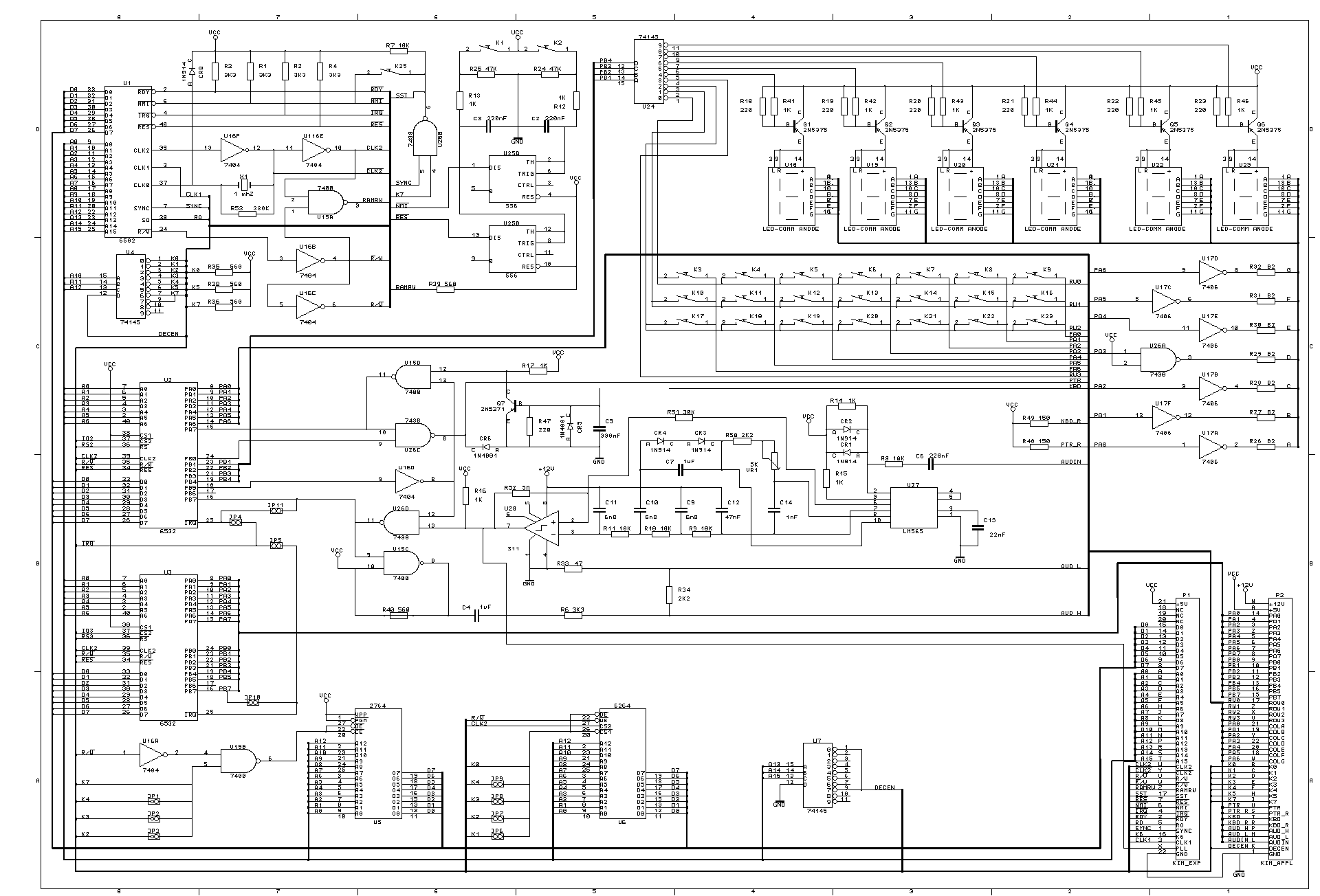
Feeling moved by some of the KIM-1 RetroChallenge entries, I had a thought last weekend: could I design an Apple IIe expansion card that acted as a KIM-1 simulator? The card could contain the address decoding circuitry, KIM-1 ROMs, I/O, and some RAM. Then, the keys could be from the Apple IIe, or maybe an external keypad. The Apple IIe would supply most of the RAM and the 6502 processor (of course). Utilizing the Apple IIe's INHIBIT (/INH) circuit would allow me to disable the IIe RAM and ROM and supply my own from the KIM-1, with out any address conflicts. The idea is so simple, I am surprised it hasn't been tried before. Researching the idea, I came across some schematics for building a modern KIM-1:

After spending some time researching the various ICs and circuits, I noticed an error in the 6502.org schematic. There is no decoder chip to select which of the 6532 RIOT chips is active.

Upon further research, I found Zimmers.net FTP site, with an identical schematic but with a 74LS138 IC in position U9 However, upon further research on the 6532 RIOT there is still a problem. The 74LS138 decoder does not appear to create the appropriate signals to select the correct RIOT's onboard RAM, according to the 6532 RIOT datasheet and KIM-1 memory map (see end of full post for details). I searched around, and found a schematic for the Micro-Kim which corrects the problem with several NAND gates.

I wondered, 'Why decode the address lines just to NAND them back together in various ways'? I made chart of all of the addresses and the bit logic to encode them and I am fairly confident that the 6532 RIOTs can be properly addressed by:

  • using A6 and a new /A6 as the chip selects
  • inverting A7 to make a new /A7 as the RAM select
  • using K5 as the other chip select
  • using A8 as the high bit of the RAM Address (A6) so that we can address all of the RAM on both RIOTs

As a result, we get 2 RIOTs and 256K of addressable RAM with the same basic memory map of the KIM-1. We need a single 74LS04 IC to invert a few of the address signals (which we already need to invert A4, according to the above schematics), and there is no need for the 74LS138 decoder or the 74LS00 NAND IC used in the Micro-Kim.

I created a spreadsheet to list all of the address values and visualize the signals I need.

Friday, January 22, 2016

Watched Steve Jobs (movie)

I watched Steve Jobs, the movie tonight. It was pretty good. It focused on 3 big product launches, with everyone coming to Steve Jobs to wish him luck, reminisce, etc. It portrayed Steve Job's growth as a visionary / CEO (and human being) through large leaps in time, which made the changes all the more pronounced. The acting was quite good, especially from Kate Winslet (who I didn't even recognize at first). Seth Rogan made a more likable Steve Wozniak than the actor in Jobs. The exploration of Steve Job's relationship with John Sculley was much more interesting than the portrayal in Jobs too.

The acting really carried this movie. Not much focus on Apple technology or period settings. This movie could easily be a live play with its very few scene changes, focus on the actors, and 3 act structure. Anyway, not a movie for tech junkies, but very well acted and directed.

Thursday, January 21, 2016

Color Monitor!

I thought I would need to buy a monitor for the Apple IIe, but instead I just re-purposed my daughter's old TV. Finally, games in color, instead of a tiny green-screen! Original Mario Bros, here I come!

Friday, January 8, 2016

Watched Jobs (movie)

For my first RetroChallenge task, I found the movie "Jobs" on Netflix tonight, so rather than be productive, I watched all of it.

Ashton Kutcher was decent. Other than the original Apple, there was not much screen time for Apple technology. The period cars are great - 70's Volvos, Mercedes, Pintos, Camaros, Corvettes, Triumph TR-7.

It was interesting to see the portrayal of Steve Jobs' perfectionism and how unique his personality was in the computer industry. I was surprised at the cold portrayal of relationships between Jobs and Steve Wozniak and Jobs and CEO John Sculley. I think the general tone seemed to portray Jobs as a victim of getting his company stolen from him. Steve Jobs definitely seemed to mellow with age from poor team manager to brilliant CEO.

Not a great movie, but not bad. Worth watching for free on Netflix.

Wednesday, January 6, 2016

RetroChallenge 2016/01 Attempt

So, RetroChallenge 2015/07 was a total flop for me. All I managed to do was go to the beauty shop to find hydrogen peroxide for Retr0brite. I couldn't find what I needed and pretty much gave up on everything. But, January has always been a better month for me to do this. Just a few, very practical goals:

  • Get a color monitor for my Apple IIe
  • Watch and review Steve Jobs, and Jobs
  • Try again to hook up an RS232 WIFI device to an old Macintosh, or maybe the Apple IIe

Sunday, June 28, 2015

RetroChallenge 2015/07 Agenda

July RetroChallenge requires moderation for me, so I will keep my challenges simple:

Monday, February 23, 2015

Reviving an original Macintosh

About a decade ago, I bought an old, neglected and very yellowed original Macintosh from Craig's List for $20. Inside was a Macintosh Plus logic board, but since the back panel had not been modified, the computer would not even close correctly. The analog board worked, but I wasn't going to modify the case to fit the logic board. I have been waiting for a long time to find a 128K logic board to properly fit inside of it.

I got lucky on ebay a few weeks ago and scored a Macintosh 128K logic board with a RAM and SCSI upgrade, as well as a 800k drive and the Mac Plus bracket for the drive. It was advertised as a "Vintage CPU Design Apple Macintosh 128k to Mac Plus motherboard upgrade kit." $75, including shipping from Canada, seemed like a good deal, since I have struggled to get anybody to let go of one for less than $100.

The board arrived about week ago and had the brand "CPU Design" on it. I screwed everything together, and it booted right up. It had 2.5 MB RAM, SCSI, and newer ROMs. The old Mac finally lives!

Click the link below to see lots of photos.

Monday, February 16, 2015

ElWhip 0.07 with New Features

I added some features to the ElWhip web server, some of which are built in to lwip, and some are completely new:
  • Dynamic File Read: The server will read the file in chunks which saves memory and allows much larger files to be in downloaded.
  • Dynamic headers: The server generates the headers now and they are not required in the HTML files. This makes it easier to add images and file downloads.
  • HEAD HTTP method support: The server responds appropriately to HEAD method requests.
  • 'Gentle Quit' in 128K: The application will report an error rather than crashing when trying to quit with 128K RAM.
See the ElWhip Download Page for more details.

Tuesday, February 3, 2015

RC 2015/01 Epilogue

A member of 68kmla.org was nice enough to test out ElWhip on a real Macintosh 128K: ...and a 512K.

First time getting a REAL Macintosh 128K on the internet. So great!

Sunday, February 1, 2015

ElWhip 0.06 Download and Video Finale

ElWhip Webserver 0.06 Download now available.

RetroChallenge 2015/01 Summary:

  • Repaired video on my Macintosh
  • Compiled and modified lwIP Web server to run on Macintosh
  • Wireless logging
  • Modified Mini vMac to run virtual serial ports on PPC Mac OS X
  • Lubricated all of my old Mac disk drives
  • First web server to run on Macintosh 512K
  • First PPP connection, TCP/IP stack, and web server to run on a (virtual) Macintosh 128K

So, a ton of work, but a success, even though it could still use a little work to clean up a few things. Thirty-one years after its introduction, the original Macintosh is finally on the web! This was a great experience and I was able to learn a little too much about the Macintosh Toolbox. This was a bigger project than I expected, and it took a lot of tweaking to get everything running in 128K. Thanks for the motivation RetroChallenge!

Loading HTML files in 128K

I spent most of yesterday trying to track down a nasty bug in the lwIP http server. Most of lwIP is very well coded, and other than the CRLF problem I had, very portable and bug-free. The lwIP http server is a bit of a hodgepodge of code though. Lucky me. Anyway, the callback to release the html file resources happens before the server has sent the TCP packet. As a result, I was free()ing memory before the server was done with it which caused corruption in the HTTP headers. I decided to just keep a file buffer up all of the time instead of malloc()ing and free()ing memory as needed. This was a constraint on the size of file that can be loaded though.

I spent the rest of the night moving more PPP code into a separate code segment that I can unload once the connection is up. It worked so well, I was shocked when I saw 9K of free RAM. This easily left me 4K of RAM to load HTML files. I can even open the menus without crashing. Unfortunately, it crashes on Quit on a 128K because it needs too much RAM to bring down the interface.

So, I will get an upload ready and get a video done in the morning!